
VAT return periods and filing categories in South Africa
13 July 2025

Selecting the correct Value-Added Tax return category requires aligning enterprise turnover with statutory filing intervals mandated by tax authorities.
South African Value-Added Tax (VAT) vendors must calculate and declare their net tax liabilities to the South African Revenue Service (SARS) according to specific reporting periods established under the Value-Added Tax Act 89 of 1991 (VAT Act) 1 2 3 4. Tax periods dictate whether a small or medium enterprise (SME) must submit a VAT201 declaration monthly, bi-monthly, six-monthly, or annually 2 4 5 6 7.
Submitting declarations under an unassigned category or miscalculating period boundaries triggers automated late-submission penalties, interest charges, estimated assessments under Section 95 of the Tax Administration Act 28 of 2011 (TA Act), and serious disruptions to an enterprise's tax compliance status 8 9 10 11 12 13.
Tax category and the assigned filing period
Statutory categories and turnover thresholds
The South African tax framework provides five distinct reporting categories for registered VAT vendors, determined by enterprise entity type, annual turnover, and historical compliance records 1 2 4 5 6 7:
— Practical point from this guide
- Category A: Bi-monthly reporting covering two calendar months ending on the last day of January, March, May, July, September, and November 2 14 15.
- Category B: Bi-monthly reporting covering two calendar months ending on the last day of February, April, June, August, October, and December 2 14 15. Categories A and B represent standard vendor allocations upon initial registration 16 17.
- Category C: Monthly reporting required when the total value of taxable supplies (turnover) exceeds or is likely to exceed R30 million in any consecutive 12-month period 5 14 15. Category C also applies if a vendor submits a written application or if SARS imposes monthly filing due to repeated failure to perform statutory duties 5 14 15.
- Category D: Six-monthly reporting ending on the last day of February and August 6 15 18. This category is restricted to vendors who solely carry on farming activities with annual turnover under R1.5 million, or registered micro businesses under the Sixth Schedule to the Income Tax Act 58 of 1962 6 12 15 19.
- Category E: Annual reporting ending on the last day of the vendor's year of assessment 7 15 20. This category applies exclusively to companies or trust funds whose activities consist solely of letting fixed property, renting movable goods, or managing connected companies, where recipients are registered vendors entitled to full input tax deductions 7 15 20 21.
While older legal guides state the compulsory VAT registration threshold as R1 million in any consecutive 12-month period 15 22, current SARS registration guidance administers an updated threshold of R2.3 million; this represents an administrative position enforced by the revenue authority rather than a statutory amendment to Section 23 of the VAT Act 22. The voluntary registration threshold remains R50 000 in taxable supplies made or expected within 12 months 23 24 25.
Erroneous fields and material consequences
Errors frequently arise when vendors attempt to file a VAT201 return using an incorrect tax period code (CCYYMM) or report figures in an unassigned period on eFiling 10 26. Misallocating a filing category or missing a statutory due date results in severe administrative consequences 8 9 12. If a return is not received by the due date—the 25th of the month for manual submissions or the last business day for eFilers—SARS issues an estimated assessment under Section 95(1)(c) of the TA Act 8 9 10 11 27.
Late payments attract mandatory statutory penalties and interest 8 9 13. Misfiling also compromises the vendor's compliance status on the SARS eFiling system, blocking access to tax clearance certificates and delaying valid vendor refund claims 28 29.
Preserve the original records: tax category
Statutory record retention mandates
Under Section 55 of the VAT Act and relevant provisions of the TA Act, every registered vendor is legally required to retain original financial records, source documents, tax invoices, debit notes, credit notes, and bank statements for a minimum period of five years 30 31 32. This statutory requirement applies strictly to all tax period submissions, category allocation notices, and eFiling filing control tables 31 33 34.
Preserving historical assessment data
When a vendor submits an original VAT201 declaration, SARS processes it as an original tax assessment 35 36. Vendors must never attempt to overwrite, delete, or obscure historical submission records 34 35. Regulator guidance dictates that all previous versions of a return, unique Payment Reference Numbers (PRNs), submission channels, and timestamped logs must remain permanently accessible within the eFiling VAT Work Page 34 37 38 39.
Evolv Accountants recommends establishing strict internal data governance protocols. Source tax invoices, export documentation, and accounting journals must be archived securely in digital and physical formats, ensuring that any subsequent audit by SARS can trace declared figures directly back to immutable primary records 30 32 40.
Choose the correct amendment route: the assigned filing period
Distinguishing corrections, replacements, and adjustments
When a vendor identifies an error or category discrepancy in a previously submitted tax period, selecting the legally approved amendment pathway is vital 35 41 42 43 44:
- Request for Correction (RFC): If an error occurred on a filed VAT201 return, the vendor must initiate a Request for Correction via eFiling or request a manual revision form from SARS 35 41 43. An RFC creates a new version of the return under the original Payment Reference Number (PRN) 35 45.
- Prior-Period Input Tax Restrictions: Regulator guidance explicitly prohibits increasing input tax deductions when revising a past tax period 42 43. If a vendor omitted valid input tax in a previous period, the deduction cannot be retroactively added to the past return; instead, it must be claimed in a current or future tax period return within five years from the date of first entitlement 42 43.
- Later-Period Transactional Adjustments: Adjustments arising from debit notes, credit notes, or bad debts must be declared in the tax period during which the debit/credit note is issued or the bad debt is written off, rather than altering historical returns 44 46.
- Disputing Estimated Assessments: Where SARS issues a Section 95(1)(c) estimated assessment due to non-submission, the TA Act prevents vendors from lodging a standard dispute against the estimate 10 11. The vendor must submit the outstanding original VAT201 return or request an extension of time to submit relevant material 10 11. A formal suspension of payment may be requested while the outstanding submission is processed 10 11.
Make and verify the correction: tax category
Approved change and correction sequence
To correct a return or change an assigned tax period category, vendors must execute the following structured sequence:
- Conduct a turnover and eligibility audit: Review 12 months of consecutive rolling turnover to determine whether the business is legally obligated or eligible to change categories (e.g., crossing the R30 million Category C threshold) 5 14 47.
- Schedule an official eBooking appointment: Category changes cannot be executed directly on eFiling by the vendor; the vendor must schedule an eBooking appointment to visit a SARS branch office 17 34 48.
- Submit formal category application: Present written motivation, enterprise financial statements, and company statutory documents to the SARS official 5 17 48.
- Initiate Request for Correction on eFiling: For return revisions, log into eFiling, locate the VAT Work Page for the specific tax period, and select "Request for Correction" 35 43.
- Populate complete revised values: Complete the revised VAT201 return entering full corrected figures across all fields (not merely the net difference between old and new amounts) 35 43 49.
- Upload supporting documentation: Attach relevant tax invoices, calculations, and bank statements via eFiling or the SARS Online Query System when submitting version 3 or higher, or when prompted by SARS risk management 28 38 50 51.
Verifying updated record proof
After lodging a category change or return revision, vendors must verify that SARS systems reflect the updated state:
- VAT Filing Control Table: Check the 12-month eFiling control table to confirm period breakers and ribbon indicators 33 52 53 54. Green ribbons confirm return receipt, orange ribbons mark required returns, red ribbons flag overdue returns, and blue ribbons indicate periods where no return is required 53 54.
- Notice of Assessment (VAT217): Confirm that eFiling displays an updated VAT217 assessment notice reflecting the revised net balance 11 41.
- VAT Statement of Account (VATSOA): Request a VATSOA via eFiling to verify that payments, processed revisions, and interest allocations match internal ledger balances 28 51 55.
| Original record | Error | Authorised action | Changed record | Proof and downstream check |
|---|---|---|---|---|
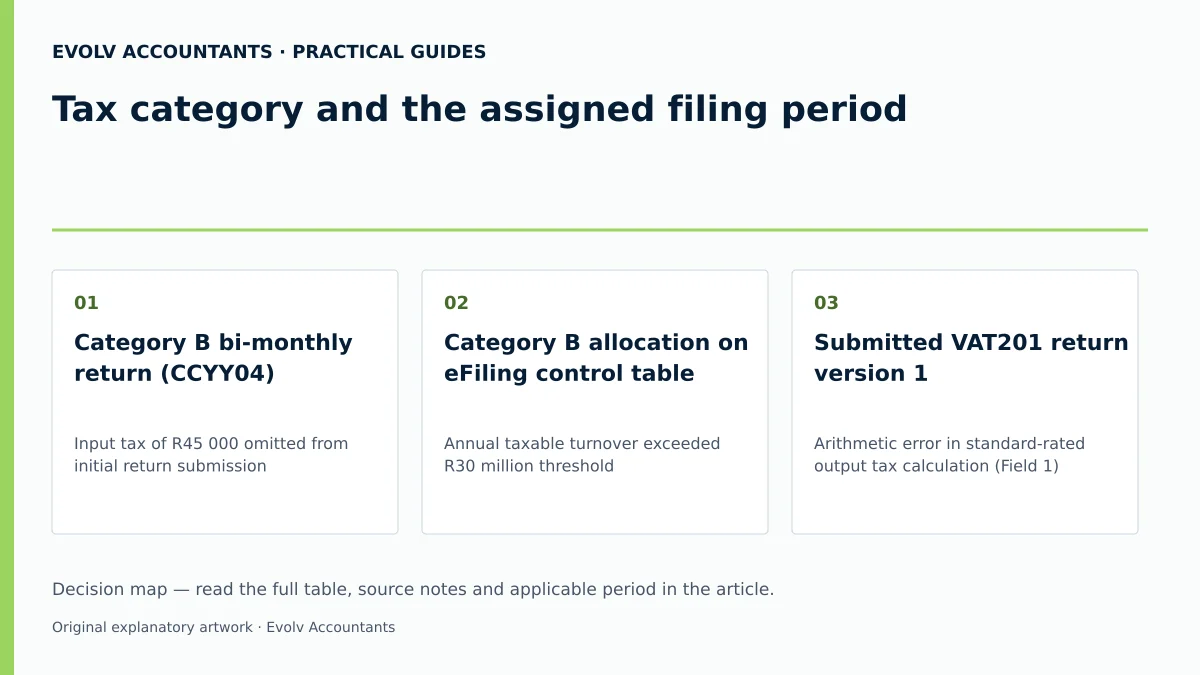
| Category B bi-monthly return (CCYY04) 2 26 | Input tax of R45 000 omitted from initial return submission 42 43 | Claim omitted input tax in current open tax period return within 5-year limit; do not alter past return 42 43 | Current period VAT201 return (Field 15) reflecting total allowable input tax 42 56 | Tax invoice held in records; verified against current VAT217 assessment notice 11 56 |
| Category B allocation on eFiling control table 2 33 | Annual taxable turnover exceeded R30 million threshold 5 14 | Apply for reclassification to Category C monthly filing via SARS eBooking branch visit 5 17 48 | Updated eFiling profile reflecting Category C monthly return periods 5 52 57 | Green/orange monthly indicators on VAT Filing Control Table; updated VATSOA 53 54 55 |
| Submitted VAT201 return version 1 35 39 | Arithmetic error in standard-rated output tax calculation (Field 1) 35 58 | Submit Request for Correction (RFC) on eFiling with full revised figures 35 43 | Revised VAT201 return version 2 sharing original Payment Reference Number (PRN) 35 45 | eFiling Work Page status "Submitted"; updated VAT217 assessment notice issued 11 41 |
| Original VAT201 return under audit review 38 50 | Attempted to lodge online revision while SARS audit was active 38 50 | Submit requested supporting material via eFiling work page; await audit finalisation 10 38 50 | Finalised SARS audit assessment (VAT217) or official closure letter 11 38 41 | Audit completion notice; updated balance on "My Compliance Profile" 11 28 41 |
Consequences and remaining exceptions: the assigned filing period
Linked records and downstream accounting impacts
A change in filing category or a correction to a VAT return impacts multiple linked tax and administrative records 8 34 37 59:
- Payment Reference Numbers (PRNs): Every VAT201 return issued by SARS contains a unique 19-digit PRN 34 37 60. Payments made via Electronic Funds Transfer (EFT) or eFiling must quote the exact PRN associated with that specific tax period to prevent unallocated payments and late-payment penalties 8 34 37 60.
- Diesel Refund Scheme Integration: Primary producers registered for the Diesel Refund Scheme declare fuel usage in Fields 25, 29, and 33 of the VAT201 declaration 6 37 59. Diesel refunds are offset directly against net output tax liability (Field 20) 37 59 61. Incorrect return period selection delays both VAT processing and diesel refund payouts 37 59.
- Income Tax and Financial Statement Reconciliation: Declared taxable supplies (Fields 1, 1A, 2, 2A) and deductible input tax (Fields 14, 14A, 15, 15A) must reconcile perfectly with annual financial statements and corporate income tax declarations 56 58 62 63.
Special statutory exceptions
Tax law and SARS guidance provide key exceptions regarding return period boundaries 4 57 64:
- The 10-day rule: Under Section 27 of the VAT Act and Binding General Ruling 19, a vendor may apply in writing to end a tax period on a fixed day within 10 days before or after the last day of the calendar month (e.g., the last Friday of the month) to align with commercial accounting cycles 4 64 65. This requires formal written approval from SARS and must be applied consistently for at least 12 months 4 64 65.
- Mandatory Category C Notification: A vendor whose taxable turnover exceeds R30 million must notify SARS in writing within 21 days of becoming liable for Category C 57 66. Failure to notify SARS may lead to penalties and interest 12.
- Automatic Category Reassignment: SARS holds statutory authority to reassign a vendor automatically to Category A, B, or C if the vendor ceases to qualify for a specialized category or repeatedly fails to fulfill filing duties 5 67 68.
Reproducible hypothetical example
Enterprise: Kwanazo Logistics CC (a South African transport SME). Scenario: Kwanazo operates as a Category B bi-monthly vendor 2. Due to fleet expansion, Kwanazo's rolling 12-month taxable supplies increase from R24 million to R33 million at the end of May. Statutory Trigger: Having exceeded the R30 million Category C threshold 5 14, Kwanazo is legally required to notify SARS within 21 days and transition to Category C monthly filing 57 66.
Step-by-Step Execution:
- Threshold Verification: Kwanazo calculates total taxable supplies for the preceding 12 months as R33 000 000 (exceeding the sourced R30 million threshold) 5 14.
- Branch Application: Kwanazo books an eBooking appointment and submits a written application at a SARS branch to update its tax period from Category B to Category C 17 34 48.
- Monthly Return Calculation (Illustrative Values):
- Standard-rated freight services rendered in June (VAT-inclusive): R3 450 000 58.
- Output tax formula: Consideration × (r ÷ 100 + r), where r = 15% (sourced standard rate) 33 58 69.
- Output Tax (Field 1A / Field 4): R3 450 000 × (15 ÷ 115) = R450 000.00 58.
- Allowable Input Tax on operational purchases (Field 15): R180 000.00 56.
- Net VAT Payable (Field 20): R450 000.00 - R180 000.00 = R270 000.00 61.
- Submission and Payment: Kwanazo submits the June VAT201 return electronically via eFiling on the last business day of July, using the pre-populated PRN for payment via electronic funds transfer 9 27 37 70.
Next steps for VAT returns
Assigning internal controls and operational recurrence
To maintain flawless VAT compliance across assigned tax periods, Evolv Accountants recommends that SMEs implement the following governance procedures alongside our professional bookkeeping, tax advisory, payroll, and statutory compliance services:
- Assign a Control Owner: Designate a qualified internal accounting officer or external tax advisor to oversee tax period allocations, eFiling profile management, and return approvals 71 72.
- Implement Rolling Turnover Checks: Establish a recurring monthly control to calculate rolling 12-month taxable turnover, ensuring immediate identification of Category C (R30 million) or registration threshold transitions 5 14 47.
- Establish Pre-Submission Checklist:
- Verify that the active eFiling return period code matches the current tax period 26.
- Confirm that all input tax claims are supported by valid full tax invoices (for supplies exceeding R5 000) or abridged tax invoices (under R5 000) held in company records 56 73.
- Ensure the payment is submitted using the exact 19-digit Payment Reference Number (PRN) generated for that specific period 37 60.
- Schedule Quarterly Compliance Reviews: Conduct regular checks of the eFiling VAT Filing Control Table and request a VAT Statement of Account (VATSOA) to verify that all historical returns display "Received" status and account balances are fully reconciled 28 51 53 55.
Frequently Asked Questions
How do I confirm which VAT return category SARS has currently allocated to my business?
You can confirm your assigned tax category by logging into SARS eFiling, opening the "VAT Filing Control Table" under your active VAT profile, or requesting a VAT Statement of Account (VATSOA) 28 33 55. The control table displays your active tax periods, return due dates, and submission history across a 12-month timeline 33 53 54.
What happens if my business turnover exceeds the Category C threshold of R30 million?
If your rolling 12-month taxable turnover exceeds or is likely to exceed R30 million, you are legally required to notify SARS in writing within 21 days 5 57 66. SARS will update your registration to Category C, requiring you to submit VAT201 returns and make payments on a monthly basis via eFiling 5 12 27 57.
Can I increase input tax claims on a past VAT period by lodging a Request for Correction?
No. SARS rules explicitly prohibit increasing input tax deductions on a revised return for a past tax period 42 43. Omitted input tax must be claimed on a current or future VAT201 return, provided the claim is made within five years from the date of initial entitlement 42 43.
What is the 10-day rule for ending a VAT tax period?
The 10-day rule allows a vendor with written SARS approval to end a tax period on a fixed day or date up to 10 days before or after the last day of the calendar month to align with commercial accounting cycles 4 64 65. Once approved, the chosen cut-off day must be used consistently for at least 12 months 64 65.
How do payment deadlines differ between manual submission and SARS eFiling?
For manual submissions at a SARS branch, both the VAT201 return and payment must be received by the 25th day of the month following the tax period end (or the preceding business day) 8 9 27 70. For registered eFilers who submit returns and pay electronically via eFiling, the deadline is extended to the last business day of the month 8 9 27 70. Ask Evolv about tax category and the assigned filing period. Share the relevant records so the support required can be scoped.
Related guides
- Completing a VAT201 return step by step
- When a VAT201 return and payment are due
- The Proactive SARS Audit Guide: Keeping Your Business Ledger Sanitised
Sources
- Tax periods for VAT | South African Revenue Service
- https://www.sars.gov.za/wp-content/uploads/Ops/Guides/Legal-Pub-Guide-VAT404-VAT-404-Guide-for-Vendors.pdf
- FAQs for VAT vendors | South African Revenue Service
- Obligations of a VAT vendor | South African Revenue Service
- https://www.sars.gov.za/wp-content/uploads/Ops/Guides/GEN-ELEC-04-G01-Guide-for-completing-the-Value-Added-Tax-VAT201-Declaration-External-Guide.pdf