
When a VAT201 return and payment are due
31 October 2024

A South African VAT201 declaration requires vendors to account for output tax collected and input tax paid within specified statutory deadlines.
For registered South African Value-Added Tax (VAT) vendors, return submission and payment deadlines are determined by the allocated tax period category and the chosen filing channel 1 2 3 4. Vendors submitting returns manually at a South African Revenue Service (SARS) branch or making payments outside SARS eFiling must ensure both the VAT201 return and cleared payment are received by SARS on or before the 25th day of the month following the end of the tax period 1 2 5 6.
Where the 25th falls on a Saturday, Sunday, or public holiday, the due date automatically shifts to the last preceding business day 1 6. Vendors who register as eFilers and submit both their return and payment electronically via SARS eFiling are granted an extended deadline until the last business day of the calendar month following the tax period 1 3 5 6.
Crucially, submitting a VAT201 return and settling the net VAT liability are distinct statutory duties; submitting a return without full payment triggers an immediate 10% late payment penalty plus interest 7 8 9.
Return and payment deadlines kept distinct
Reader, jurisdiction, and tax periods
This practical guidance applies to South African small and medium enterprises (SMEs), close corporations, private companies, sole proprietors, and trusts operating as registered VAT vendors under the administration of SARS 10 11 12 13. Every registered vendor is assigned by the Commissioner to a specific tax period category that dictates reporting frequency 4 14 15:
- Category A: Two-monthly tax periods ending on the last day of January, March, May, July, September, and November 14 16 17.
- Category B: Two-monthly tax periods ending on the last day of February, April, June, August, October, and December 14 16 17.
- Category C: Monthly tax periods, required for vendors whose taxable turnover exceeds or is likely to exceed R30 million in any consecutive 12-month period, or by written application/Commissioner directive 17 18 19.
- Category D: Six-monthly tax periods ending in February and August, applicable to micro businesses or agricultural enterprises with taxable turnover under R1.5 million 20 21 22.
- Category E: Twelve-monthly tax periods ending on the vendor's year of assessment, restricted to connected companies or trusts with property letting or management activities 23 24.
Distinguishing law, regulator guidance, and Evolv recommendations
To manage tax governance effectively, SME management must distinguish statutory legislation, administrative regulator guidance, and professional accounting practices:
- Statutory Law: Section 28 of the Value-Added Tax Act (read with the Tax Administration Act) mandates that vendors submit VAT declarations and pay net VAT liabilities by the statutory deadline 6 9 25. Category C vendors are legally required to file and pay electronically 26 27. Late payment attracts a mandatory 10% penalty under the Tax Administration Act plus interest at the prescribed rate 7 8.
- Regulator Guidance: Official SARS guides (such as the VAT 404 Guide and VAT201 External Guide) define operational submission channels and cut-off rules 3 28 29. SARS guidance establishes that while non-eFiling channels mandate filing and payment by the 25th (or preceding business day), electronic filing and payment via eFiling extends both deadlines to the last business day of the month 1 2 3 5 6. Regulator guidance also sets out the 10-day rule allowing approved alternative tax period cut-off dates 30 31.
- Evolv Recommendations: Evolv Accountants advises SME owners to decouple return completion from payment processing in their internal controls. The return establishes the assessed tax debt or refund, but compliance is only satisfied when cleared funds reach SARS under the correct Payment Reference Number (PRN) 20 32 33. Evolv recommends finalising general ledger reconciliations five business days prior to the deadline to avoid rush errors and potential banking cut-off delays.
Meaning of statutory completion
Completing the return declaration generates a self-assessment notice (VAT217) 34 35 36. However, return submission does not discharge the debt owed to the State 37 38. True completion requires:
- Valid submission of the VAT201 return reflecting an eFiling status of "Filed through eFiling" or "Submitted at SARS" 34 39 40.
- Full settlement of any net output tax liability via an approved payment method referencing the period's pre-populated 19-digit PRN, reaching SARS's bank account on or before the due date 9 20 33 41.
- For refund returns, maintaining verified bank details and providing requested supporting documentation within required timeframes 7 42 43 44.
Prepare the information and authority: return
Documents, records, and permissions required
Before initiating a VAT201 return, the vendor or authorised representative must compile primary financial records and ensure administrative system access:
— Practical point from this guide
- Output Tax Inputs: Sales journals, tax invoices issued, tax credit notes issued, and records of capital asset disposals (Field 1A) 45 46 47.
- Input Tax Inputs: Supplier tax invoices containing all prescribed statutory details (full tax invoices for supplies over R5 000; abridged tax invoices for supplies up to R5 000), debit notes, and valid proof of payment for second-hand goods (Form VAT264) 46 48 49 50.
- Import Documentation: Customs bills of entry, SARS eFiling payment receipts, and EDI Customs Status 1 Release Messages for imported goods, or foreign supplier invoices and VAT215 records for imported services 51 52 53.
- System Authority: An active eFiling profile with the VAT tax type activated 54 55. Where Evolv acts on behalf of the client, a valid Power of Attorney and tax practitioner registration must be filed with SARS 13 54.
Core statutory definitions and thresholds
- Output Tax: The 15% VAT levied and collected by a vendor on the supply of goods or services made in the course of carrying on an enterprise 10 11.
- Input Tax: VAT charged to the vendor on goods or services acquired, or paid on the importation of goods, allowable as a deduction against output tax provided valid tax invoices or customs receipts are held 10 11 53.
- Payment Reference Number (PRN): A unique 19-digit alphanumeric code generated by SARS for each VAT201 return (structured as the 10-digit VAT registration number followed by a 9-digit period-specific code) 20 33 41.
- Administrative Threshold Position Note: Statutory provisions in older vendor guides specify a compulsory VAT registration threshold of R1 million in taxable turnover over a 12-month period 12. Current SARS registration guidance administers an updated R2.3 million threshold position, whereas older guides retain the R1 million benchmark 12 56. This reflects an administrative position applied by SARS in practice, rather than an unqualified statutory amendment to Section 23 of the VAT Act.
Complete the task step by step: payment deadlines kept distinct
Executing a VAT return and settling the resulting liability requires a disciplined, multi-step workflow.
Sequenced operational process
- Reconcile Accounting Records: Reconcile output tax collected and input tax paid against the general ledger trial balance 46 57. Audit supplier invoices to ensure no input tax is claimed without a valid tax invoice reflecting the vendor's correct details 46 49.
- Request the VAT201 Return on eFiling: Log into eFiling, select Returns > Returns Issued > Value Added Tax (VAT201), choose the correct tax period, and click "Request Return" 55 58 59. Note that returns can only be requested and submitted from the 1st day of the month following the end of the tax period 34.
- Capture Return Fields: Open the editable HTML return 60. Enter standard rate sales, capital asset sales (Field 1A), zero-rated supplies, and exempt supplies in Part A 45 61. Capture capital and standard input tax deductions in Part B 61 62. Mandatory fields appear in red until properly completed, turning green upon valid entry 61.
- Submit the VAT201 Declaration: Review the automatically calculated net VAT liability in Field 38 (a positive figure indicates payment due to SARS; a negative figure indicates a refund due) 62. Click "Submit VAT201" 61 63 64. Confirm the eFiling work page updates the return status to "Filed through eFiling" 39 65.
- Effect Payment as a Separate Operational Task:
- Payment via eFiling Credit Push: On the VAT201 Work Page, click "Make Payment", specify the payment amount, select the linked bank account, and authorize the credit push transaction on your commercial online banking platform 2 37 66 67 68.
- Payment via Direct Bank EFT: Alternatively, process an EFT directly through an approved commercial bank using the exact pre-populated 19-digit PRN 2 33 41.
- Deadline Adherence: For eFilers using eFiling or EFT, cleared funds must reach SARS on or before the last business day of the month 2 5 6. For non-eFiling channels or manual returns, payment must reach SARS by the 25th day (or preceding business day) 2 5 6.
- Archive Compliance Evidence: Download and store the submitted VAT201 return, the Notice of Assessment (VAT217), the PRN payment confirmation, and underlying general ledger reconciliations for the mandatory five-year record-keeping period 10 34 35 46 69.
Reproducible hypothetical example
- Scenario: SME Enterprise (Pty) Ltd is a Category A vendor (two-monthly period ending 31 May 2026) registered on eFiling.
- Part A (Output Tax): Standard rate sales of R1 150 000 (VAT inclusive at 15%), comprising R150 000 output tax. Capital asset sale (Field 1A) of R230 000 (VAT inclusive), comprising R30 000 output tax 45. Total Part A Output Tax = R180 000 62.
- Part B (Input Tax): Standard rate operational expense purchases supported by valid tax invoices totalling R575 000 (VAT inclusive), comprising R75 000 input tax 62. Capital equipment purchase of R115 000 (VAT inclusive), comprising R15 000 input tax 62. Total Part B Input Tax = R90 000 62.
- Net Calculation (Field 38): Part A (R180 000) minus Part B (R90 000) = R90 000 payable to SARS 62.
- Filing & Payment Execution: On 15 June 2026, the vendor submits the VAT201 on eFiling. The unique 19-digit PRN (e.g., 4123456789VC2026051) is populated on the return 20 41. On 30 June 2026 (the last business day of June), the vendor authorizes an eFiling credit push payment of R90 000 using that specific PRN 2 5 67. Both return filing and payment obligations are successfully fulfilled within statutory parameters 1 5 6.
Check the result against the evidence: return
Submitting a return on eFiling does not automatically verify complete legal compliance. Independent confirmation evidence must be checked and retained.
Completion evidence verification
- Return Filing Status: Access the VAT201 Work Page on eFiling to confirm that the return status reflects "Filed through eFiling" or "Submitted at SARS" and verify that a Notice of Assessment (VAT217) has been generated 34 35 39 70.
- Payment Allocation Evidence: Download the eFiling Payment Confirmation printout or bank EFT receipt displaying the transaction date, amount, and matching 19-digit PRN 41 69.
- Statement of Account (VATSOA): Request a VAT Statement of Account on eFiling by selecting the transactional year and specifying the period range (YYYYMM) 54 71. Confirm that the payment has been correctly allocated against the assessment for that period and that no outstanding balance or administrative penalties appear 71 72.
- VAT Refund Tracking: Where Field 38 reflects a refund (input tax exceeds output tax), SARS is required to payout the refund within 21 business days of receiving the correctly completed return 7 8 42 62. Interest is payable by SARS if payment exceeds 21 business days, unless SARS places an audit stop or bank verification hold 7 8 42 43 44. Monitor progress under the "Refund Status" tab on the VAT Work Page 60 70.
Handle exceptions and unresolved cases: payment deadlines kept distinct
Operational edge cases and statutory consequences
- Late Payment Penalty and Interest: Filing a VAT201 return on time without making payment (or paying late) triggers an immediate 10% penalty on the outstanding tax amount, plus statutory interest 7 8. Currently, SARS does not levy a separate administrative penalty for late filing alone where no tax is payable, but late filing delays assessment and refund processing 7 42 73.
- Weekends and Public Holidays: If the 25th day or the last day of the month falls on a Saturday, Sunday, or public holiday, the due date for submission and payment automatically shifts to the last preceding business day 1 6.
- Estimated Assessments under Section 95: If a vendor fails to submit a return, SARS may issue an estimated assessment under Section 95 of the Tax Administration Act 35 74. Vendors cannot dispute an estimated assessment directly via objection; they must file the outstanding return or submit relevant material 35 74 75. Under Section 95 statutory amendments, a vendor may submit a "Request for Extension" to submit relevant material for up to 5 years and 40 business days from the date of the estimated assessment 76 77. If no extension is requested or if the 5-year and 40-day window lapses, the estimated assessment becomes final and irrevocable 75 76.
- Request for Correction (RFC) Boundaries: Errors on submitted returns must be corrected using the Request for Correction facility on eFiling 54 78 79. While Part A output tax can be adjusted up or down, Part B input tax on a past return can only be decreased via RFC 78. To claim an omitted input tax deduction from a prior period, the vendor must claim it on a subsequent return within 5 years from the date of first entitlement 80.
- Specialist Boundaries: Where returns are flagged for SARS verification or audit, or involve complex apportionment calculations, international electronic services, or Voluntary Disclosure Programme (VDP) applications, Evolv's tax advisory team provides specialist intervention 54 56 57 81 82.
Next steps for VAT returns
Task and completion checklist
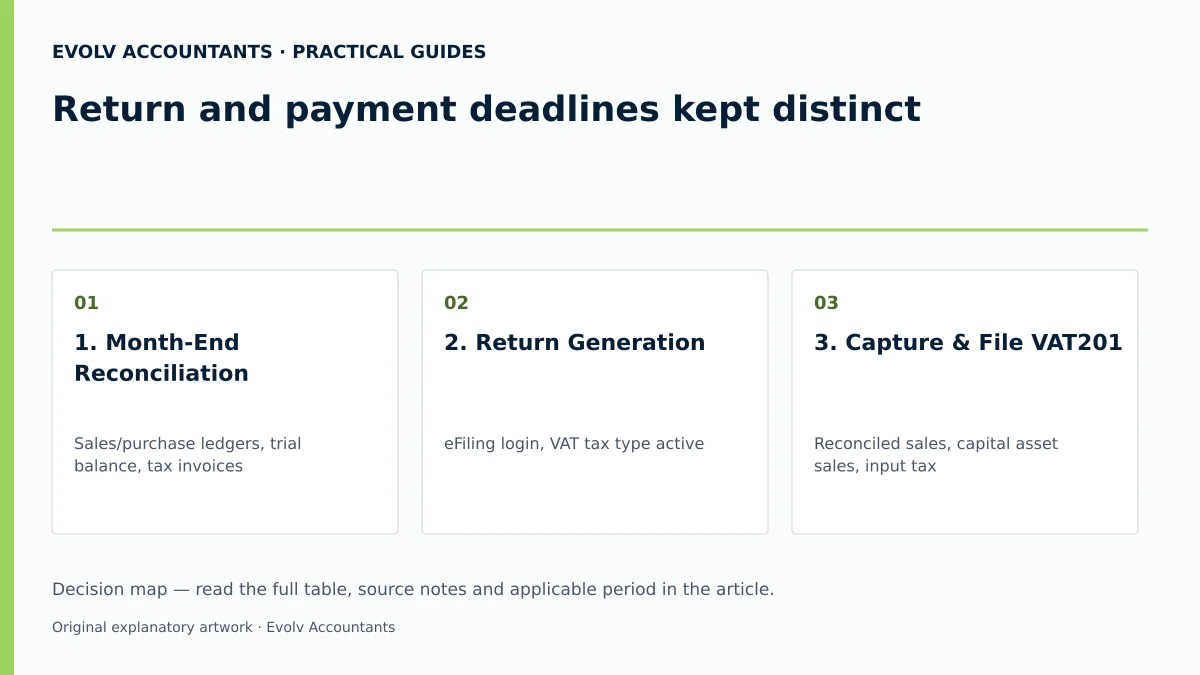
| Step | Input or evidence | Responsible person | Completion check | Exception or next action |
|---|---|---|---|---|
| 1. Month-End Reconciliation | Sales/purchase ledgers, trial balance, tax invoices 46 57 | SME Accountant / Bookkeeper | Output/input tax verified against valid invoices 46 48 | Resolve missing supplier tax invoices before filing 46 83 |
| 2. Return Generation | eFiling login, VAT tax type active 54 55 | Registered eFiler / Tax Practitioner | VAT201 requested for correct tax period 55 59 | Check filing control table if period is unavailable 55 84 |
| 3. Capture & File VAT201 | Reconciled sales, capital asset sales, input tax 45 61 62 | Finance Manager / Evolv Consultant | Status reflects "Filed through eFiling" 39 65 | Review JavaScript mismatch warning if amounts vary 65 |
| 4. Process VAT Payment | Pre-populated 19-digit PRN, banking facility 33 41 66 | Authorised Financial Signatory | Payment authorised before bank cut-off 2 6 67 | If abandoned, complete payment under "General Unpaid" menu 69 78 |
| 5. Verify Allocation | eFiling Payment Confirmation, VATSOA 54 69 71 | SME Owner / Evolv Advisor | VATSOA reflects zero balance for period 71 72 | Use RFC or payment allocation tool if misallocated 72 78 |
| 6. Audit Archiving | VAT201, VAT217 Notice, proof of payment 10 34 35 46 | Compliance Officer | Records archived securely for 5 years 10 46 85 | Prepare supporting document upload if audit letter issued 70 86 |
Actionable next steps for SME management
- Audit Vendor Category: Confirm your assigned SARS tax period category (A, B, C, D, or E) and calendar cut-off rules 4 14.
- Implement Dual Controls: Separate the internal process of filing the VAT201 return from the payment release task to guarantee both deadlines are met 1 2 37.
- Verify PRN Usage: Ensure every electronic payment explicitly references the unique 19-digit PRN generated for that specific tax period 20 33 41.
- Monitor Account Statements: Request a monthly VATSOA on eFiling to catch unallocated payments or interest charges early 54 71.
- Engage Professional Support: Partner with Evolv Accountants for comprehensive bookkeeping/accounting, tax advisory, payroll, and company/statutory compliance management.
Frequently Asked Questions
Is the deadline for submitting a VAT201 return the same as the payment deadline?
Yes, under statutory rules, the return submission due date and the payment due date fall on the exact same day 1 2 5 6. For manual filers or non-eFiling payments, both are due by the 25th day of the month following the tax period (or preceding business day) 1 2 5 6. For registered eFilers who submit and pay via eFiling, both deadlines are extended to the last business day of the month 1 3 5 6.
What happens if I file my VAT201 return on time but pay a day late?
SARS levies an immediate 10% late payment penalty on the outstanding VAT amount, plus statutory interest 7 8. Submitting the return on time avoids estimation but does not protect against late payment penalties 7 8 35.
Can I correct a mistake on a previously submitted VAT201 return?
Yes, you can submit a Request for Correction (RFC) on eFiling 54 78 79. Output tax in Part A can be increased or decreased 78. However, Part B input tax on a past period can only be decreased via RFC; any omitted input tax must be claimed on a future return within 5 years of entitlement 78 80.
How long does SARS take to pay out a VAT refund?
SARS is required to pay out a valid VAT refund within 21 business days of receiving a correctly completed return 7 8 42. If payment is delayed beyond 21 business days without an active verification, audit, or banking detail hold, SARS must pay interest at the prescribed rate 7 42 43 44.
What should I do if SARS issues an estimated assessment under Section 95?
You cannot file an objection directly against a Section 95(1)(c) estimated assessment 35 74. You must submit the outstanding VAT201 return or request an extension to submit relevant material, which is allowed up to 5 years and 40 business days from the assessment date 75 76 77. Ask Evolv about return and payment deadlines kept distinct. Share the relevant records so the support required can be scoped. Contact our advisory team at #article-enquiry for tailored assistance with bookkeeping/accounting, tax advisory, payroll, and statutory compliance.
Related guides
- Completing a VAT201 return step by step
- Submitting a nil VAT return
- The Proactive SARS Audit Guide: Keeping Your Business Ledger Sanitised
Sources
- Obligations of a VAT vendor | South African Revenue Service
- https://www.sars.gov.za/wp-content/uploads/Ops/Guides/GEN-ELEC-04-G01-Guide-for-completing-the-Value-Added-Tax-VAT201-Declaration-External-Guide.pdf
- https://www.sars.gov.za/wp-content/uploads/Ops/Guides/Legal-Pub-Guide-VAT404-VAT-404-Guide-for-Vendors.pdf
- FAQs for VAT vendors | South African Revenue Service
- Tax periods for VAT | South African Revenue Service