
Submitting a nil VAT return
3 October 2026

Submitting a nil VAT return requires a registered South African vendor to declare zero output and input tax for an active tax period.
Even when a South African registered Value-Added Tax (VAT) vendor achieves zero turnover, conducts no taxable supplies, and incurs no deductible business expenses during a reporting cycle, South African tax law obliges the enterprise to lodge a complete VAT201 declaration with the South African Revenue Service (SARS) by the statutory due date 1 2.
Failing to submit a return simply because there was no trading activity triggers administrative non-compliance penalties, enables SARS to issue estimated assessments under Section 95 of the Tax Administration Act, and blocks the business from obtaining or maintaining a compliant Tax Clearance Status 3 4 5.
No activity evidence and nil declaration checks
Scope, Jurisdiction, and Legal Framework
This practical compliance draft applies to small and medium-sized enterprises (SMEs), close corporations, private companies, sole proprietors, and registered representative vendors operating within the Republic of South Africa under the jurisdiction of SARS. Statutory VAT compliance is governed primarily by the Value-Added Tax Act 89 of 1991 and the Tax Administration Act 28 of 2011 5 6.
Applicable Tax Periods
Under South African tax administration, vendors are assigned to specific reporting categories based on enterprise structure and turnover 7 8:
- Category A and Category B: Bi-monthly tax periods ending on the last day of alternating calendar months 8.
- Category C: Monthly tax periods, applicable to vendors whose taxable supplies exceed R30 million in any consecutive 12-month period, or those placed in this category by the Commissioner 7 9.
- Category D: Six-monthly tax periods, restricted to qualifying micro-businesses or farming enterprises with turnover under R1.5 million 10.
- Category E: Annual tax periods, available to specific connected property or equipment leasing entities 11.
What Completion Actually Means
Completing a nil VAT return means populating and lodging a formal VAT201 declaration wherein all output tax supply fields (Fields 1 to 12) and all input tax deduction fields (Fields 14 to 18) are submitted with zero values, resulting in a net liability of R0.00 in Field 20 12 13 14. The law specifies that where no taxable supplies were made, or where no tax is payable or refundable for the tax period, the vendor remains legally required to submit a nil return to SARS 1 2.
Statutory Legislation vs Regulator Administrative Position
Under Section 23 of the Value-Added Tax Act, compulsory VAT registration is legislated when total taxable supplies (turnover) exceed the statutory threshold of R1 million in any consecutive 12-month period 6 15. While published SARS vendor guides reflect this statutory R1 million threshold 6 15, current SARS registration guidance administers an operational registration threshold of R2.3 million.
Evolv highlights that this R2.3 million figure represents SARS's operational administrative position rather than an unqualified statutory amendment to Section 23 of the VAT Act 6.
Prepare the information and authority: no activity evidence
Required Authorisations and Platform Access
Before attempting to file a nil VAT201 declaration, the responsible person or representative vendor must ensure the following authorities and digital permissions are active:
- eFiling Profile Delegation: Authorisation as a registered eFiler or representative tax practitioner linked to the taxpayer's profile 16 17.
- Tax Type Activation: Successful activation of the Value-Added Tax (VAT) type on the eFiling profile 16 17.
- Representative Vendor Appointment: Formal appointment of the public officer or representative vendor on SARS records 18 19.
Mandatory Documents and Evidence Inputs
To prove zero business activity and satisfy SARS audit standards, the vendor must compile and review the following primary evidence inputs:
— Practical point from this guide
- Bank Statements: Full corporate bank statements covering every day of the tax period, confirming zero commercial receipts and zero operational expenditure.
- Sales Register: A zero-rated or zero-entry sales ledger demonstrating that no tax invoices, abridged invoices, debit notes, or credit notes were issued 2 20.
- Purchase Register: An expense ledger verifying that no supplier tax invoices were received and no input tax deductions are being claimed 21.
- Payment Reference Number (PRN): The unique 19-digit PRN pre-populated on the VAT201 return by SARS, which uniquely links the submission to the specific tax period 22 23 24.
- Statutory Records Retention: All zero-activity logs, bank statements, and accounting ledgers must be retained for at least five years to maintain a verifiable audit trail 18 25.
Complete the task step by step: nil declaration checks
The following sequenced process outlines the precise steps required to complete and submit a nil VAT201 declaration via SARS eFiling, grounded in current primary instructions 16 26.
Step 1: Access the Return on SARS eFiling
- Log into the SARS eFiling portal using valid credentials 16 17.
- Select the relevant taxpayer profile and navigate to the Returns tab on the main menu 26.
- Click on Returns Issued and select Value Added Tax (VAT201) 26.
Step 2: Request the Applicable Tax Period
- Locate the Return Search screen and select the exact tax period required (formatted as CCYYMM) 26 27.
- Click the Request Return button 26.
- Verify that the eFiling system generates the VAT201 Work Page for the requested period 28.
Step 3: Verify Pre-Populated Vendor Details
- Click on the editable VAT201 link to open the return in HTML format 28.
- Inspect Container Section Vendor Details and confirm that the following pre-populated fields match official records:
- Trading or Other Name 23.
- VAT Registration Number: A 10-digit registration number allocated by SARS 23 27.
- Tax Period (CCYYMM): The specific filing period 23 27.
- Payment Reference Number (PRN): The 19-digit period-specific reference 23 29.
Step 4: Complete Contact Details and VDP Indicators
- Expand the Contact Details container (highlighted in red until completed) 30 31.
- Enter the First Name, Surname, and Capacity of the person completing the return 31.
- Provide a valid business telephone number or cell phone number 31.
- Expand the Voluntary Disclosure Programme (VDP) container and select N (No), unless the return is being lodged pursuant to an active, official VDP agreement with SARS 31 32.
Step 5: Declare Zero Values in Output Tax (Part A)
Navigate to Part A: Calculation of Output Tax and Imported Services and enter zero (0) across all supply fields 12 33 34:
- Field 1 (Standard rate - excluding capital goods): Enter 0 12.
- Field 1A (Standard rate - capital goods only): Enter 0 12.
- Field 2 (Zero rate - excluding exported goods): Enter 0 33.
- Field 2A (Zero rate - exported goods only): Enter 0 34.
- Field 3 (Exempt and non-supplies): Enter 0 34.
- Field 12 (Other and imported services): Enter 0.00 13.
- Field 13 (Total Output Tax): Confirm that Total Output Tax automatically calculates to R0.00 13.
Step 6: Declare Zero Values in Input Tax (Part B)
Navigate to Part B: Calculation of Input Tax and enter zero (0.00) across all expense and adjustment fields 13 14 35:
- Field 14 (Capital goods and services supplied to you): Enter 0.00 13.
- Field 15 (Other goods and services supplied to you): Enter 0.00 13.
- Field 16 (Change in use adjustments): Enter 0.00 35.
- Field 17 (Bad debts adjustments): Enter 0.00 35.
- Field 18 (Other adjustments): Enter 0.00 14.
- Field 19 (Total Input Tax): Confirm that Total Input Tax automatically calculates to R0.00 14.
Step 7: Verify Net Declaration and Final Declaration
- Check Field 20 (Total VAT Payable / Refundable): Confirm that Total Output Tax (Field 13) minus Total Input Tax (Field 19) equals R0.00 14.
- Verify that the Diesel section remains unselected or zeroed if the enterprise holds no registered diesel refund entitlements 29.
- Review the electronic declaration statement; the login credentials of the eFiler serve as the legally binding declarant signature 36.
- Click Submit VAT201 on the toolbar to lodge the return immediately with SARS (or click Save if storing the return temporarily prior to filing) 37 38.
Check the result against the evidence: no activity evidence
Independent Completion Verification Steps
A vendor must never assume that clicking the submission button automatically guarantees final regulatory acceptance 4. To establish independent completion evidence, perform the following verification steps:
- Work Page Status Audit: Return to the VAT201 Work Page and verify that the return status transitions from "Saved" or "Issued" to Filed through eFiling (or "Submitted at SARS" if lodged via a branch appointment) 4 28 39 40.
- Download Notice of Assessment (VAT217): Locate the Notice of Assessment (VAT217) on the Work Page 4. Download and inspect the document to confirm that SARS has officially processed the assessment reflecting a net liability of R0.00 4 40.
- Request Statement of Account (VATSOA): Select Request Statement of Account on eFiling 16 41. Review the generated statement to ensure the period reflects a zero balance and that no unfiled return markers or penalty charges have been levied 16 41.
- Inspect Audit and Verification Containers: Check the Supporting Documents container on the Work Page 4. Confirm whether the status displays "No Documents Required" or indicates that SARS's automated risk engine has selected the return for verification 4 42.
- Archive Complete Audit Trail: Export and save the submitted VAT201 return, the submission confirmation receipt, the VAT217 assessment notice, and the period's zero-balance bank statements into the company's permanent statutory audit folder 18 25.
Reproducible Hypothetical Example
- Entity & Context: Meridian Tech Consultants (Pty) Ltd is a South African software firm registered for Category B bi-monthly VAT returns (filing for the May/June 2025 period, code 202506).
- Operational Fact Pattern: During May and June 2025, the company underwent corporate restructuring. It made zero taxable sales, generated no invoices, and incurred no claimable operational expenditure.
- Execution & Calculations:
- Output Tax: Field 1 = R0; Field 2 = R0; Field 3 = R0. Total Output Tax (Field 13) = R0.00 12 13 33 34.
- Input Tax: Field 14 = R0.00; Field 15 = R0.00; Field 18 = R0.00. Total Input Tax (Field 19) = R0.00 13 14.
- Net Calculation: Field 20 = Field 13 (R0.00) − Field 19 (R0.00) = R0.00 14.
- Outcome Verification: Upon clicking "Submit VAT201", eFiling displays "Your return has been successfully submitted" 43. The Work Page updates status to "Filed through eFiling", and a VAT217 assessment notice is issued showing R0.00 payable 4 43. A subsequent VATSOA request confirms a R0.00 balance, successfully completing the filing cycle 16 41.
Handle exceptions and unresolved cases: nil declaration checks
Exception 1: Omitted Income or Expenses Discovered Post-Submission
If a vendor discovers an omitted sales invoice or supplier expense after lodging a nil return, the initial declaration was inaccurate. Under SARS procedures, the vendor must lodge a Request for Correction (RFC) on eFiling 44 45. This action creates an editable Version 2 of the VAT201 return under the same PRN 45. The full revised figures—not merely the difference—must be entered 45 46.
Evolv Recommendation: While output tax errors must be corrected immediately via RFC to avoid interest and understatement penalties, law and regulator guidance permit omitted input tax to be claimed in a subsequent tax period, provided the claim is made within five years from the date of first entitlement 46.
Exception 2: eFiling "Amount Mismatch" Warning Window
When lodging a nil return following prior periods of active trading, eFiling frequently displays a warning popup: "The Total Amount you have entered does not seem to be valid... Amount entered is substantially different from the previous months total submission" 43. This is an automated system validation check 43. The vendor must carefully verify that zero activity is indeed correct and click OK to proceed with filing 43.
Exception 3: Section 95 Estimated Assessments Issued by SARS
If a vendor fails to lodge a nil return by the statutory deadline, SARS may issue an estimated assessment under Section 95(1)(c) of the Tax Administration Act 4 47.
- Regulator Rule: A vendor cannot lodge a formal dispute or objection against a Section 95(1)(c) estimated assessment 47.
- Remedial Action: The vendor must submit the outstanding return or request an extension within 40 business days from the date of the VAT217 notice 4 48. If the vendor fails to submit the return or apply for an extension within 40 business days (or within an approved extension window), the estimated assessment becomes final 48.
Exception 4: SARS Verification and Supporting Document Requests
If SARS's risk engine selects a nil return for verification, the status on the Work Page will update to "Waiting for Documentation to be Uploaded" 4. The vendor must upload zero-activity bank statements, an affidavit confirming zero trading, and zero-entry sales/purchase registers via eFiling or the SARS Online Query System 42 49.
Exception 5: Persistent Zero Trading and Deregistration Risks
Where an enterprise continuously submits nil returns due to complete cessation of trading, SARS may review the business's registration status 50. Under Section 24 of the VAT Act, SARS may cancel a vendor's registration if the enterprise has ceased trading or never actually commenced trading 50. However, SARS will refuse final deregistration until all outstanding returns are submitted and all tax obligations are settled 51.
Next steps for VAT returns
Task and Completion Checklist
| Step | Input or evidence | Responsible person | Completion check | Exception or next action |
|---|---|---|---|---|
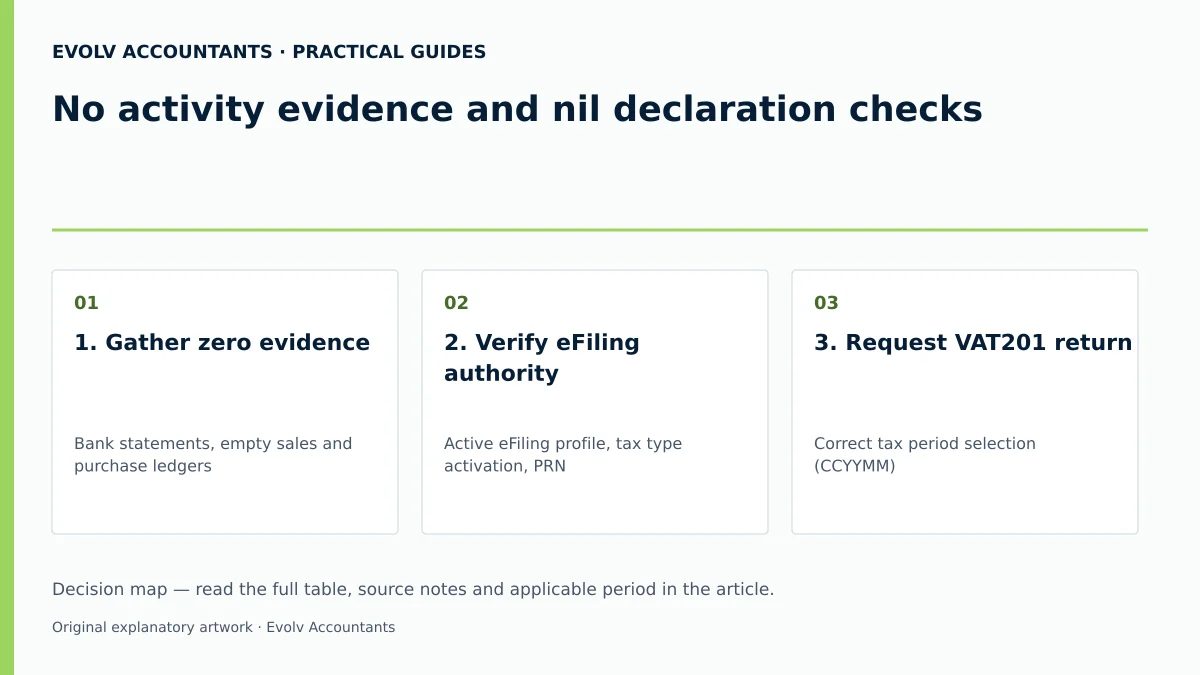
| 1. Gather zero evidence | Bank statements, empty sales and purchase ledgers | Financial Manager / Bookkeeper | All statements reflect zero commercial activity for the period | If transactions exist, switch from nil return to standard VAT201 filing |
| 2. Verify eFiling authority | Active eFiling profile, tax type activation, PRN 16 17 23 | Representative Vendor / Tax Practitioner | Profile linked and current VAT201 return issued on profile 26 | Resolve profile access or tax type activation with SARS if blocked 16 17 |
| 3. Request VAT201 return | Correct tax period selection (CCYYMM) 26 27 | Representative Vendor / Tax Practitioner | Editable VAT201 return opened in eFiling work page 28 | Use 'Refresh' button if period does not display under control table 52 |
| 4. Populate zero declaration | First Name, Surname, Capacity; R0 output tax, R0.00 input tax 12 13 31 | Representative Vendor / Tax Practitioner | Field 13 = R0.00, Field 19 = R0.00, Field 20 = R0.00 13 14 | Clear red container error markers by completing required contact fields 30 |
| 5. Submit return to SARS | Digital declarant signature via eFiling login 36 | Representative Vendor / Tax Practitioner | Click 'Submit VAT201'; confirmation message displayed 37 43 | Confirm 'Amount mismatch' popup if flagged by eFiling system 43 |
| 6. Verify assessment & archive | VAT217 assessment notice, VATSOA, bank statements 4 16 41 | Public Officer / Financial Director | Work page status = "Filed through eFiling"; VAT217 shows R0.00 4 40 | Upload bank statements via eFiling if selected for SARS verification 42 |
Frequently Asked Questions
Am I legally required to submit a VAT201 return if my company made zero sales during a tax period?
Yes. South African tax law dictates that every registered VAT vendor must submit a VAT201 return for every allocated tax period by the statutory due date, regardless of whether taxable supplies were made or any tax is due 1 2.
What is the statutory deadline for submitting a nil VAT return to SARS?
For vendors submitting manually or paying via a branch, the deadline is the 25th day of the month following the end of the tax period 3 53. For registered eFilers submitting electronically, the deadline is extended to the last business day of the month following the tax period end 3 53 54.
Can I claim input tax for bank charges or accounting fees on a nil return during a zero-revenue period?
If the enterprise incurs valid, standard-rated business expenses (such as administrative bank charges or audit fees) while carrying on an active enterprise, those expenses may be declared in Field 15 13 21. However, doing so means the return is no longer a "nil" return, but a refund claim, which may trigger SARS verification 4 55. If no input tax is claimed, all fields remain zero 13 14.
What should I do if SARS issues an estimated assessment because a nil return was submitted late?
You cannot lodge a formal dispute or objection directly against a Section 95(1)(c) estimated assessment 47. You must immediately request the outstanding VAT201 return on eFiling, complete the nil declaration, and submit it (or apply for a formal extension) within 40 business days of the assessment notice 4 47 48.
How do I correct a nil VAT return if I discover an unrecorded customer invoice after filing?
You must access the submitted return on eFiling and click Request for Correction (RFC) 44 45. This opens a new version of the VAT201 return for that period, allowing you to enter the correct output tax figures and submit the updated assessment to SARS 44 45.
Related guides
- Completing a VAT201 return step by step
- Preparing your first VAT return after registration
- The Proactive SARS Audit Guide: Keeping Your Business Ledger Sanitised
Sources
- https://www.sars.gov.za/wp-content/uploads/Ops/Guides/Legal-Pub-Guide-VAT404-VAT-404-Guide-for-Vendors.pdf
- Obligations of a VAT vendor | South African Revenue Service
- https://www.sars.gov.za/wp-content/uploads/Ops/Guides/GEN-ELEC-04-G01-Guide-for-completing-the-Value-Added-Tax-VAT201-Declaration-External-Guide.pdf
- Tax periods for VAT | South African Revenue Service
- FAQs for VAT vendors | South African Revenue Service