
Completing a UI19 when employment ends
29 March 2026

A UI-19 is an employer declaration of employee details, employment dates and termination reasons. Paying UIF through SARS does not replace employee declarations.
Completing a UI19 form when employment ends requires a South African employer to declare an employee's employment details, termination date and termination reason to the Unemployment Insurance Commissioner.
For South African small and medium-sized enterprises (SMEs), completing the UI19 form—or submitting its digital equivalent via the uFiling portal—is a mandatory statutory duty whenever an employee's service terminates 1 2 3.
Although Unemployment Insurance Fund (UIF) financial contributions for SARS-registered employers are collected monthly by the South African Revenue Service (SARS) via the EMP201 return 4 5 6, worker service declarations and termination updates must strictly be lodged directly with the Unemployment Insurance Commissioner (UI Commissioner) 3 7.
Capturing the correct termination date and specific reason for termination establishes the employee's official service history, enabling legitimate benefit claims while ensuring employer payroll compliance under national legislation 1 8 9.
Termination dates reasons and UI19 evidence
Scope, Reader, and Jurisdiction
This guide is structured specifically for South African SME employers, payroll administrators, and company directors operating within the Republic of South Africa 10 11. The legal framework governing unemployment insurance compliance comprises the Unemployment Insurance Act 63 of 2001 (UI Act), the Unemployment Insurance Contributions Act 4 of 2002 (UIC Act), and the Tax Administration Act 28 of 2011 (TA Act) 8 12.
Reporting Periods and Statutory Meaning of Completion
UIF compliance operates on monthly payroll reporting cycles 1 5. Employers must submit monthly declarations reflecting all employee details by no later than the 7th day of each calendar month 1 5. The statutory remuneration ceiling for UIF contribution calculations, effective 1 June 2021, is set at R17,712 per month (R212,544 per annum) 13 14.
Completing the UI19 task actually means successfully registering and updating the exiting employee's exact commencement date, final termination date, wage details, and statutory reason for termination on the UI Commissioner’s central database 1 9 15. This update updates the national database used to pre-qualify former workers for statutory benefit claims 1 9.
Distinguishing Legal Duties, Regulator Guidance, and Evolv Recommendations
- Legal duties and records: Employers must register and provide the prescribed monthly employee information to the UI Commissioner. The employment database is used when benefits are assessed; payment of contributions to SARS does not replace those employee declarations. SARS UIF guidance; UIF employee-record guidance.
- Regulator Guidance: Operational instructions issued in SARS External Guide UIF-GEN-01-G01 and Department of Employment and Labour manuals define filing channels, form fields, and electronic submission formats 16 17.
- Evolv Recommendations: Evolv Accountants advises SMEs to perform internal pre-submission verifications matching payroll records against signed employment contracts, resignation letters, or CCMA awards before lodging the final UI19 record to prevent post-employment disputes or processing delays.
Prepare the information and authority: termination dates reasons
Distinct Administrative Boundaries for PAYE, SDL, and UIF
Employers must maintain clear distinctions between Pay-As-You-Earn (PAYE), Skills Development Levy (SDL), and UIF responsibilities 2 7 18. Employers required to register with SARS for PAYE or SDL must collect and pay monthly UIF contributions directly to SARS via the EMP201 return 2 6 19. However, SARS External Guide UIF-GEN-01-G01 specifies that "the UI-19 declaration must ONLY be submitted to the UI Commissioner" 3.
Payment of contributions to SARS does not automatically fulfil the obligation to declare employee service history to the UI Commissioner 3 7.
Mandatory Information Inputs and Document Records
Before initiating a UI19 submission, the employer must gather verified inputs:
- Employee Identity: Full natural name, South African identity number or valid passport details, and demographic contact details 15 20.
- Employment Service Dates: Exact commencement date of employment and precise final termination date 15.
- Financial Inputs: Gross salary paid, UIF deductible salary (subject to the statutory ceiling), and total monthly hours worked 13 14 15.
- Termination Classification: The specific prescribed reason for termination (e.g., dismissal, resignation, retrenchment, expiry of fixed-term contract, retirement, or death) 15 21.
- Authority Records: The employer's official UI reference number assigned by the UI Commissioner 22.
Excluded Workers and Remuneration Deductions
Not all workers or remuneration components attract UIF contributions:
- Worker Exclusions: Under Sections 4 and 5 of the UIC Act, workers employed for less than 24 hours in a calendar month, national or provincial public service officers, and elected public office holders are excluded 23 24. Non-natural persons and independent contractors are also excluded from employee returns 1 11.
- Remuneration Exclusions: Under Section 1 of the UIC Act, remuneration excludes pensions, superannuation or retiring allowances, statutory lump sum payouts defined under gross income paragraphs (a), (cA), (d), (e), and (eA) of the Income Tax Act, and amounts paid by way of commission 25 26.
Complete the task step by step: ui19 evidence
Sequenced Process for UI19 Declaration Submission
To lodge a UI19 declaration using official digital instructions, follow this sequence 1 15 17 21 27 28:
- Access the Portal Profile: Log into the employer profile on the UI Commissioner’s uFiling portal or open the integrated payroll declaration manager 1 17 27. Note that user interfaces in older portal manuals may vary from current active web screens 1.
- Locate Employee Record: Select the "Declarations Manager" or "Employment Summary" tab and retrieve the terminating worker's record using their identity number 15 21.
- Capture Termination Date: Enter the worker's actual date on which employment ends, verified against the employment and termination records in the designated termination date field 15.
- Select Termination Reason: Choose the exact statutory termination reason matching internal contractual documentation 15.
- Update Final Salary and Hours: Input the final month's gross remuneration, capped UIF deductible salary, and monthly hours worked 13 14 15.
- Submit Declaration: Save the updated employee profile and click "Submit" to send the electronic declaration directly to the UI Commissioner database 28 29.
Reproducible Hypothetical Calculation Example
To illustrate the calculation rules for an exiting employee, consider a worker earning a gross monthly salary of R20,000 13 14 30:
- Statutory Contribution Rates: 1% employee deduction + 1% employer contribution = 2% total contribution 13 30.
- Statutory Earnings Ceiling: Capped at R17,712 per month (effective 1 June 2021) 13 14.
- UIF Deductible Remuneration: R17,712 (the excess R2,288 is excluded from remuneration for UIF purposes) 4 13 14.
- Employee Deduction (1%): R17,712 × 0.01 = R177.12 4 13 30.
- Employer Contribution (1%): R17,712 × 0.01 = R177.12 4 13 30.
- Total Monthly Remittance to SARS: R177.12 + R177.12 = R354.24 submitted on the EMP201 return 4 31.
- UI19 Service Record: Record the exact service dates and termination reason, the actual gross salary of R20,000, and the separately calculated UIF-deductible salary of R17,712 in the appropriate fields 15 17. All values are illustrative based on statutory rates.
Check the result against the evidence: termination dates reasons
Independent Verification vs Submission Assumptions
Employers must not assume that clicking submit guarantees statutory acceptance 28. Independent verification requires checking that the portal dashboard status updates to "Submitted" or "Accepted" 28 32. Employers should use the "Calculate Returns" function to confirm that all employee records have been fully processed without system validation errors 28.
— Practical point from this guide
Annual Reconciliations and Five-Year Record Retention
- Annual EMP501 Reconciliation: In terms of Paragraph 14(3) of the Fourth Schedule to the Income Tax Act, employers must submit an annual Employer Reconciliation Declaration (EMP501) 33 34. This reconciles monthly EMP201 payments made to SARS against total UIF deductions reflected on employee IRP5/IT3(a) certificates 33.
- Five-Year Record Retention: Chapter 4 of the TA Act and Paragraph 14(1) of the Fourth Schedule mandate that every employer keep a register of remuneration paid, UIF contributions deducted, and copies of UI19 declarations for 5 years from the submission date 35 36. These records must remain available for inspection by SARS or UIF compliance officers 36.
Handle exceptions and unresolved cases: ui19 evidence
Managing Data Corrections, Bank Updates, and Vetting
- Correcting Stored Declarations: Under uFiling operational rules, submitted monthly declarations cannot be edited directly; updating or correcting underlying employee service details automatically updates the corresponding declaration 21.
- Employer payment accounts: The guide describes adding an employer account through “Add New” and saving with “Update”. UI2.8 is the separate process for the user’s own banking-information changes; do not treat it as a prerequisite to a UI-19 termination update. uFiling guide.
- Registration Vetting Failures: If vetting fails, follow the portal prompt to contact uFiling Support through “UIF Services Support”. Send identity documents only through the route and with the safeguards specified by the support team. uFiling user guide.
- Notice of Appeal: If a worker's benefit application is refused or suspended, a written Notice of Appeal must be lodged within 90 days of receiving the decision notice 41.
Statutory Offences and Penalties
Failing to submit declarations, failing to withhold or pay contributions, or submitting false statements constitutes an offence under Chapter 17 of the TA Act and the UIC Act 3 42 43. Defaulting employers incur a mandatory 10% penalty on outstanding contributions 44, interest calculated at the statutory prescribed rate 45, estimated assessments issued by SARS 46, and potential liability upon conviction to a fine or imprisonment for up to 2 years 43 47.
Next steps for UIF employer duties
Task and Completion Checklist
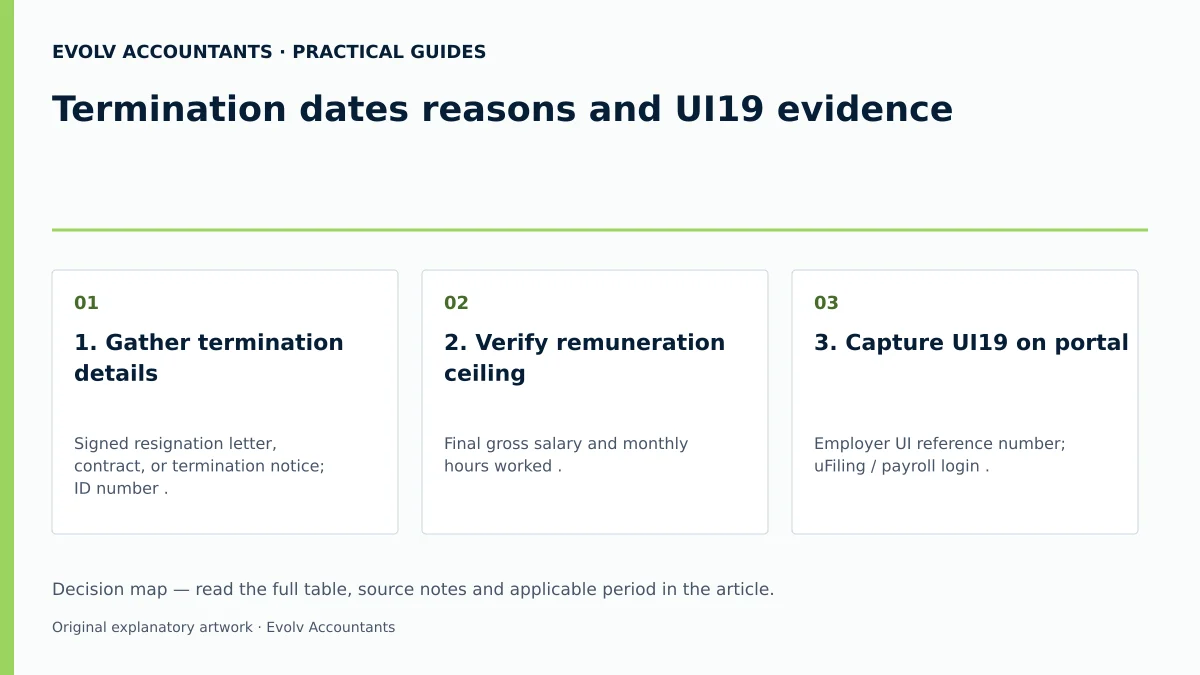
| Step | Input or evidence | Responsible person | Completion check | Exception or next action |
|---|---|---|---|---|
| 1. Gather termination details | Signed resignation letter, contract, or termination notice; ID number 15 20. | Payroll Administrator | All core service dates and termination reasons verified against HR file. | Resolve date or reason discrepancies before portal entry. |
| 2. Verify remuneration ceiling | Final gross salary and monthly hours worked 13 15. | Payroll Administrator | Capped UIF deductible salary calculated correctly at R17,712 maximum 13 14. | Exclude non-UIF remuneration elements like commission or retiring allowances 25. |
| 3. Capture UI19 on portal | Employer UI reference number; uFiling / payroll login 22 27. | SME Manager / Accountant | Employee termination date and statutory reason captured in declaration manager 15. | If registration vetting fails, submit documentation to UIF Services Support 40. |
| 4. Submit declaration & verify | Electronic UI19 submission interface 28 29. | SME Manager / Accountant | Submission confirmation retained and declaration status shows "Submitted" 28. | Use "Calculate Returns" to review declaration history; resolve the actual error or follow UIF support instructions 28. |
| 5. Archive records & reconcile | Final UI19 confirmation report; EMP201 return 6 36. | Compliance Officer | Copy stored securely in payroll file for mandatory 5-year retention period 36. | Reconcile total annual figures during EMP501 filing 33. |
Frequently Asked Questions
1. Is a UI19 declaration required if our business already pays UIF to SARS via EMP201?
Yes. Paying contributions to SARS via EMP201 does not update worker service records; all employers must lodge UI19 declarations directly with the UI Commissioner 3 7 19.
2. What is the statutory deadline for submitting monthly UI19 employee updates?
Employers must submit employee service updates and declarations to the UI Commissioner monthly, by no later than the 7th day of the following month 1 5.
3. How is the termination date handled if an employee leaves mid-month?
Capture the actual employment termination date from the employment and termination records; it need not be the last day physically attended, with remuneration for that final period capped at the monthly R17,712 threshold 13 15.
4. How can an employer correct an incorrectly captured termination reason?
The employer must update the employee's service record details in the declaration manager, which automatically recalculates and updates the UI19 declaration for the UI Commissioner 21.
5. How long must an SME retain copies of completed UI19 records?
Under Chapter 4 of the Tax Administration Act, employers are legally required to retain all employee declarations and payroll registers for 5 years 35 36.
Related guides
- UIF declarations through payroll software versus uFiling
- When a small business must register for UIF
- Compliance and Regulations: Keeping Your Business on Track
Sources
- https://www.labour.gov.za/DocumentCenter/Publications/Unemployment%20Insurance%20Fund/uFiling%20System%20User%20Guide.pdf
- https://www.sars.gov.za/wp-content/uploads/Ops/Guides/UIF-GEN-01-G01-Guide-for-Employers-in-respect-of-the-Unemployment-Insurance-Fund-External-Guide.pdf
- Unemployment Insurance Fund | South African Revenue Service