
Paying a Compensation Fund assessment with the right reference
7 September 2025

Paying a Compensation Fund assessment requires the correct 99-series contract account reference, verified current banking details and a check that the payment is allocated.
Pay a Compensation Fund assessment using the correct 99-series contract account reference and current verified banking details, then check the payment allocation on the employer’s statement.
When a South African small or medium enterprise (SME) receives its annual Notice of Assessment from the Compensation Commissioner, settlement must be made into the official Compensation Fund bank account within 30 calendar days 1 2 3. To ensure that payment is successfully allocated to the employer's statutory account, the remittance must explicitly quote the employer's unique 99-series contract account number as the banking deposit reference 3 4 5.
Omitting or misquoting this account reference causes serious payment misallocations, preventing the automated generation of a Letter of Good Standing (LOGS), leaving the entity exposed to statutory penalties, and creating unnecessary compliance risk 4 6 7 8.
Account reference and proof of payment
Legal framework vs regulator guidance vs Evolv recommendations
To manage Compensation Fund compliance effectively, SMEs must distinguish between statutory legislation, operational regulator guidance, and strategic professional recommendations:
— Practical point from this guide
- Statutory Law: The Compensation for Occupational Injuries and Diseases Act 130 of 1993 (COIDA), as amended by the Compensation for Occupational Injuries and Diseases Amendment Act 10 of 2022, creates the legal obligation for employers to register, submit annual returns of earnings (ROE), and pay assessed contributions 9 10 11. Under Section 86(1) of the Act, an assessment must be paid within 30 days after the date of the Notice of Assessment 1 2. Overdue amounts can attract interest and the applicable non-payment penalty. Read the actual notice and section 87 basis; do not assume a universal ten per cent charge on one base 7 8 12 13. Section 81(2) obliges employers to retain all payroll records and earnings registers for at least five years 10 14.
- Regulator guidance: Retrieve the current official Notice of Assessment and verify its banking details and deposit reference through the Fund’s official channel before release. Use the employer’s correct CF account reference. If payment is not allocated, retain proof and follow the Fund’s published allocation-query route. ROE invoice guidance; Payment-allocation guidance.
- Evolv Recommendations: Evolv Accountants advises SME directors to establish an internal verification protocol prior to releasing EFT payments. Employers should cross-reconcile the invoiced assessment figure against internal payroll reports, double-check that the 99-series reference matches the portal profile exactly, and store electronic proof of payment alongside the Notice of Assessment in a central statutory audit file. Amended COIDA section 81; 2026 commencement dates.
Impact of incorrect account references
Using an arbitrary reference—such as a company registration number, SARS PAYE number, or invoice number—prevents the Compensation Fund's financial system from linking the credit to the employer's contract account 4. As Department of Employment and Labour guidance notes, "payment is not allocated due to a system error, a correct Contract Account number (99…..) was not used" 4.
Until the payment is manually identified and allocated, the employer's profile remains flagged as outstanding, blocking the issuance of a Letter of Good Standing necessary for commercial tendering and vendor maintenance 4 6 15.
Prepare the information and authority: account reference
Information inputs and verification
Before initiating payment, the responsible officer or payroll manager must assemble and verify specific primary inputs:
- Official banking details: Use details verified against the current official assessment notice and Fund channel. Treat bank coordinates in old manual screenshots as historical examples. Assessment-notice guidance.
Payment control: Check beneficiary banking details against the current official Fund notice, copy the employer’s deposit reference exactly, obtain independent release approval and retain proof of payment. Fund invoice guidance.
Mandated authority and user credentials
Where an external accountant or payroll administrator handles Compensation Fund submissions, strict user credential rules apply 16. Under regulator terms and conditions, employers are legally responsible for assigning authorised representatives on the online portal 16. If an external consultant represents the business, a formal Power of Attorney must be executed and uploaded to maintain regulatory authority 17.
If a designated representative leaves the company, the employer is legally obligated to update representative details immediately to prevent unauthorised access or invalid filings 16.
Complete the task step by step: proof of payment
Sequenced workflow for assessment payment
Employers must execute a structured six-step workflow to complete an assessment payment and secure payment clearance:
- Retrieve the Notice of Assessment: Log into the official Return of Earnings online portal using registered user credentials 15 18. Navigate to the ROE menu, submit or review the annual Return of Earnings, and generate the final assessment invoice 3 19.
- Extract the 99-Series Reference: Locate the "Deposit Reference" field on the remittance screen 3. Verify that the number begins with "99" and matches the employer's primary contract account registration 3 5.
- Capture the EFT Payment: Access the employer's commercial online banking platform. Create a beneficiary payment using banking details verified against the current official Fund notice 3. Populate the beneficiary reference field exclusively with the 99-series contract account number, ensuring no additional spaces, prefixes, or letters are introduced 3 4.
- Secure Electronic Proof of Payment: Once the transaction is released by authorised bank sign-off, download the official bank-generated proof of payment (POP) containing the transaction date, amount, beneficiary bank account, and beneficiary reference.
- Verify Online Allocation: Allow standard banking clearance time, then log back into the online portal to check that the payment is credited to the correct account and assessment; “Completely processed” in the manual refers to the ROE submission, not proof of payment allocation 3.
- Download Letter of Good Standing (LOGS): Upon successful payment allocation, navigate to the portal report section to generate and download the official Letter of Good Standing 4 15.
Check the result against the evidence: account reference
Independent completion verification
Submitting an electronic funds transfer does not in itself guarantee statutory compliance; completion is only established when the Compensation Fund system credits the employer's statement 4. Employers must perform independent checks rather than assuming banking release equals regulatory clearance:
- Portal Balance Check: Confirm that the assessment invoice reflects as paid on the Compensation Fund portal 3.
- LOGS Generation Test: Attempt to download a Letter of Good Standing. If the system prevents LOGS generation due to an audit block or unallocated balance, immediate escalation is required 4 6.
- Contractor Compliance Audit: Under Section 89 of COIDA, principal contractors who engage sub-contractors must verify that each contractor holds a valid Letter of Good Standing 20 21. If a contractor fails to pay its Compensation Fund assessment, the primary principal contractor becomes jointly liable for all outstanding assessments and worker compensation costs arising from that contractor's operations 20 21.
Handle exceptions and unresolved cases: proof of payment
Payment misallocations and unallocated funds
If a payment is unallocated, send bank proof of payment to the Fund’s published allocation-query address, including the correct CF account reference so the payment can be identified. As a practical supporting control, retain the assessment notice and explain the requested allocation. The published instruction requires proof of payment; it does not prescribe a company-letterhead letter for every such query. Fund allocation guidance.
Audit blocks, earnings errors, and manual revisions
When an employer is blocked for an audit, or when an error was made on a previously submitted Return of Earnings, online corrections are disabled 3 6 17. The Department’s published administrative guidance requires an application for revision of assessment within 30 calendar days from the date of the Notice of Assessment 14. The application cannot be lodged online and requires submitting a comprehensive paper compliance pack to the Fund 17:
- A sworn affidavit stating the reasons for the error and confirming the correct earnings figures 17.
- A signed manual Return of Earnings form (WAS.8) displaying corrected actual and provisional figures 17 22.
- Supporting SARS EMP501 reconciliations and tax clearance certification 17.
- Detailed annual payroll summaries and audited or independently reviewed Annual Financial Statements 17.
- A signed Power of Attorney if an external professional represents the company 17.
Recommended exception routes:
| Case | Action and evidence |
|---|---|
| Liquidated or ceased employer | Use the Fund’s applicable manual process and confirm the documents requested for the case. |
| Audit block or ROE revision | Prepare the affidavit, signed manual ROE, payroll, EMP501 or applicable tax-clearance evidence, financial statements and representative authority required for that procedure. |
| Unallocated payment | Send proof of payment and the correct CF account reference through the published allocation-query route. |
Business closure, liquidation, and financial hardship
- Ineligible Online Entities: Businesses that have closed, ceased trading, changed the fundamental nature of their operations, or entered liquidation/sequestration are explicitly prohibited from submitting returns online 17. These entities must process closure notifications manually through regional labour centres 17 23.
- Instalment Arrangements: Employers experiencing temporary financial distress may apply for a formal instalment payment plan by emailing cfdebtors@labour.gov.za 4. The Commissioner retains statutory discretion under Section 86(1) and Section 87 to allow penalty payments or assessment liabilities to be settled in approved instalments 2 24 25.
Next steps for COIDA and compensation
Task and completion checklist
Below is a practical task checklist for SME management and payroll teams handling Compensation Fund assessment clearance:
| Step | Input or evidence | Suggested owner | Completion check | Next action |
|---|---|---|---|---|
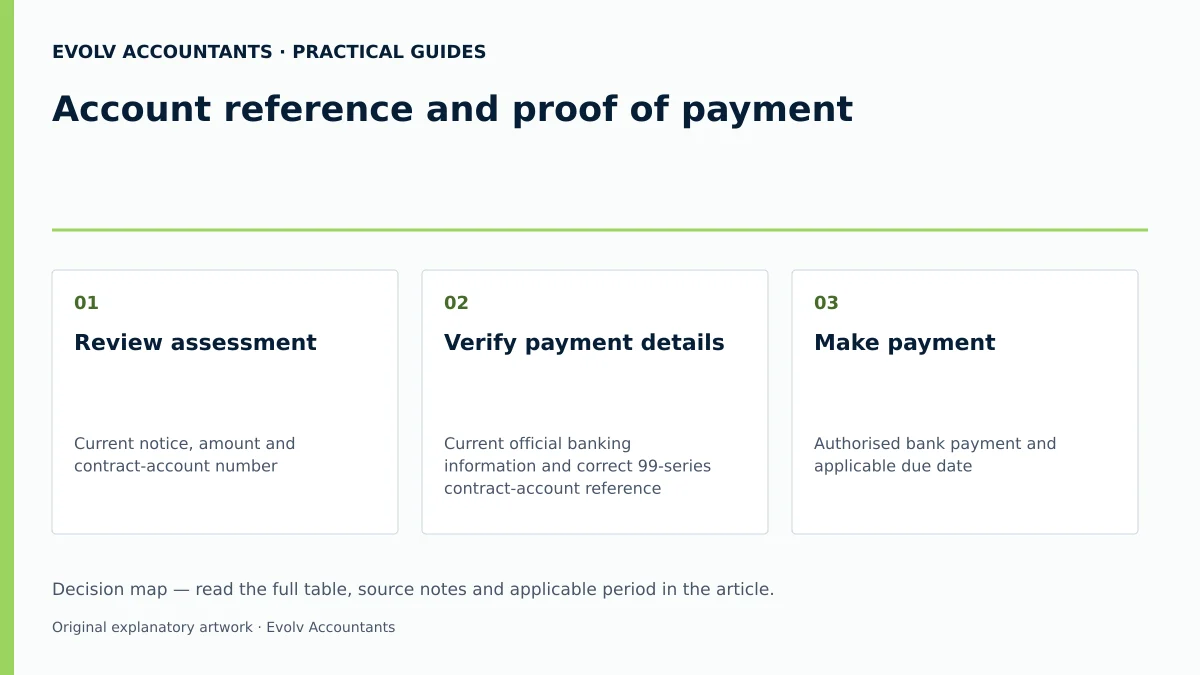
| Review assessment | Current notice, amount and contract-account number | Accountant | Employer, period, amount and due date checked | Request revision through the applicable route if earnings are incorrect |
| Verify payment details | Current official banking information and correct 99-series contract-account reference | Finance manager | Beneficiary details and reference independently checked | Do not substitute an invoice number for the required account reference |
| Make payment | Authorised bank payment and applicable due date | Bank signatory | Actual payment evidence retained | If overdue, inspect interest and the applicable section 87 penalty basis; do not assume a universal ten per cent formula |
| Confirm allocation | Fund account statement and payment evidence | Accountant | Payment credited to the correct employer and period; remaining items explained | Send unallocated-payment proof through the published query route |
| Retain records | Earnings register and supporting audit trail | Employer | Statutory earnings records retained for five years after the last entry | Keep payment and reconciliation support as a documented control |
| Request LOGS and check subcontractors | Current letter and contractor records where relevant | Authorised representative or procurement officer | Issuer’s actual letter and validity dates checked | Apply section 89’s registration, assessment-default and other relevant conditions; a missing LOGS alone does not prove liability for all claims |
Official guidance; Official COIDA provisions; Official guidance; Official COIDA provisions; Official COIDA provisions.
Reproducible hypothetical example
To illustrate the assessment calculation and payment remittance process, consider the following hypothetical SME scenario:
- Entity: Apex Precision Engineering (Pty) Ltd (illustrative SME).
- Assessment Scenario: Following the annual Return of Earnings submission on the portal, the Compensation Commissioner issues a Notice of Assessment.
- Illustrative Financial Figures:
- Actual Declared Payroll (prior assessment period): R2 500 000 (illustrative value).
- Provisional Estimated Payroll (next assessment period): R2 750 000 (illustrative value).
- Assessed Compensation Rate: 1.2% (illustrative tariff rate).
- Calculated Assessment Invoice: R33 000 (illustrative assessment liability).
- Execution & Timeline:
- The Notice of Assessment is issued on 2 May, establishing a 30-day payment deadline of 1 June under Section 86(1) 1 2.
- On 10 May, the finance team captures an EFT for R33 000 to the beneficiary verified on the current official Fund notice 3.
- The payment reference is captured strictly as 990001234567 (the entity's 99-series contract account number) 3 5.
- On 15 May, the accountant logs into the ROE portal, verifies that the account balance reflects R0,00, and successfully downloads the company's Letter of Good Standing 3 4 15.
- The bank statement, assessment invoice, and LOGS are archived in the corporate compliance repository for five years in accordance with Section 81(2) 10 14. Amended COIDA section 81; 2026 commencement dates.
Frequently Asked Questions
What exact reference number must be used when paying a Compensation Fund assessment?
Employers must use their official 12-digit contract account number, which always begins with "99" (for example, 990001067038), as the beneficiary deposit reference 3 5. Do not use your company registration number, SARS PAYE reference, or invoice number, as these will cause automated payment allocation to fail 4.
What steps should an SME take if a payment was made using an incorrect reference?
If a payment was remitted with an incorrect reference, it will not reflect on your contract account 4. You must email your bank-generated proof of payment along with your Notice of Assessment showing your correct 99-series contract account number to Clarification@labour.gov.za to request manual payment allocation 3 4.
What is the statutory payment deadline for a Compensation Fund assessment notice?
Under Section 86(1) of COIDA, an assessment must be paid within 30 calendar days from the date of the Notice of Assessment, unless the Compensation Commissioner has formally approved an instalment payment arrangement in writing 1 2 24.
How can an employer resolve an error in a previously submitted Return of Earnings?
Where incorrect earnings were declared, online edits are blocked 3 17. The employer must submit a manual revision application within 30 days of the assessment date 14. This pack must include a sworn affidavit, a signed manual WAS.8 form, SARS EMP501 documentation, audited/reviewed financial statements, detailed payroll records, and a Power of Attorney if represented by an agent 17.
What are the consequences of failing to pay an assessment on time?
Failing to pay an assessment on time attracts statutory interest under the Prescribed Rate of Interest Act 1975 12, alongside a penalty of 10 per cent of actual or estimated earnings or outstanding amounts 7 8 13. Furthermore, the account will be blocked from generating a Letter of Good Standing 4 6, and the Commissioner may use the compliance-order and Labour Court process provided by the commenced amended provisions 26 27. Describe your registration or earnings-record question and ask Evolv about the support required.
Related guides
- COIDA obligations when using subcontractors
- When an employer must register with the Compensation Fund
- Compliance and Regulations: Keeping Your Business on Track
Sources
- Compensation for Occupational Injuries and Diseases Act 130 of 1993 — original Act
- https://www.gov.za/sites/default/files/gcis_document/202304/48431-17-4-compensationoccupinjuriesdiseasesamendact10of2022a.pdf
- https://www.labour.gov.za/DocumentCenter/Publications/Compensation%20for%20Occupational%20Injuries%20and%20Diseases/Return%20of%20Earnings%20User%20Manual%2C%20August%202019.pdf
- Compensation Fund: obligations of the employer
- Compensation for Occupational Injuries and Diseases Amendment Act 10 of 2022 (English / Afrikaans) | South African Government
- How To Submit Earnings Statements to the Compensation Fund