
Registering for VAT when turnover rises unexpectedly
22 July 2025

Unexpectedly exceeding the South African VAT threshold requires prompt notification to SARS within 21 business days to review the effective date of liability.
When a South African enterprise unexpectedly exceeds the compulsory value-added tax (VAT) threshold, the vendor must submit an application for registration to the South African Revenue Service (SARS) within 21 business days 1 2. Under current SARS administrative guidance, the compulsory registration threshold is administered at R2.3 million in any consecutive 12-month period 1 3, whereas older official guides reflect the historical R1 million statutory baseline 4.
Determining the legal effective date of liability is critical because SARS eFiling allows backdating up to six months from when the threshold was exceeded 5; backdating beyond six months requires an appointment with SARS for the branch backdating route, supported by verified historical records 5 6.
Late threshold recognition and liability date review
This guidance is written for South African small and medium-sized enterprises (SMEs), company directors, sole proprietors, and designated representative vendors operating within the Republic of South Africa 7 8. The evaluation of turnover liability is governed by the South African Revenue Service (SARS) under the Value-Added Tax Act 89 of 1991 and the Tax Administration Act 28 of 2011 9 10.
The applicable operational timeframe is a continuous, rolling 12-month period assessed at the end of each calendar month, rather than a fixed financial or calendar year 3 11.
Completing a late threshold recognition and liability date review requires far more than merely submitting an electronic application form. Full completion means:
- Accurately analysing historical accounting records to pinpoint the precise calendar month in which cumulative 12-month taxable supplies crossed the compulsory threshold 11 12.
- Establishing the exact statutory effective date of liability (the first day of the calendar month following the breach month) 12.
- Determining whether the required backdating falls within the automated six-month window on SARS eFiling or mandates a branch engagement 5 6.
- Compiling verified financial documentation while discarding unacceptable speculative records 13 14.
- Submitting form RAV01 via eFiling, satisfying biometric validation, and responding to review notices within prescribed deadlines 15 16 17.
- Obtaining an official SARS Notice of Registration and verifying active vendor status on the SARS public registry 18 19 20.
Prepare the information and authority: late threshold recognition
Before initiating an application on SARS eFiling, the representative vendor must compile verified evidentiary inputs and establish legal authority 21 22.
Mandatory Supporting Documents
SARS requires objective financial records to substantiate historical taxable turnover 13 23. Acceptable documents include:
— Practical point from this guide
- Signed annual financial statements or audited financial records 5 13.
- Copies of tax invoices issued to commercial clients establishing monthly turnover 5 13.
- Signed written contracts or executed commercial agreements 5 13.
- Signed property lease agreements or asset transfer deeds 13.
- Proof of South African banking details, including a bank statement not older than three months 24 25.
- Proof of registered business address and director identity documentation 26 27.
Unacceptable Documents
SARS explicitly rejects speculative or non-binding financial materials 14. The following cannot be used to prove turnover value:
- Non-factual business plans or projection forecasts 14.
- Unawarded tender proposals or tender applications prior to contract award 14 28.
- Cash flow projections 14.
- Purchase orders placed without proof of actual delivery or supply 14.
Legal Permissions and Authority
The application must be initiated by an authorised individual. For a private company, the representative vendor is the registered Public Officer 8 29. If a registered tax practitioner submits the application on behalf of the entity, a formal SARS Power of Attorney (POA) must accompany the application. Proof of employment and a letter of authority are required where an employee of the registered tax practitioner presents it 22 30.
Biometric facial authentication may be required for individuals or representative vendors during submission 15 16.
Statutory Definitions and Threshold Distinction
An "enterprise" is defined as any activity carried on continuously or regularly in South Africa where goods or services are supplied to another person for consideration, whether or not for profit 7 9. "Taxable supplies" encompass all standard-rated (15%) and zero-rated (0%) supplies, but exclude exempt supplies such as financial services, residential accommodation, and public transport 31 32 33.
Under current SARS web guidance, SARS administers new VAT registration applications based on an increased compulsory threshold of R2.3 million in any consecutive 12-month period 1 3 34. Conversely, older published SARS guides retain the historical R1 million threshold 4. This guidance reflects current SARS administrative practice; it does not assert an unqualified statutory amendment to Section 23 of the VAT Act.
Complete the task step by step: liability date review
To rectify late threshold recognition and establish the correct liability date, execute the following sequenced workflow:
Step 1: Calculate Rolling 12-Month Taxable Turnover
At the end of each month, sum all taxable supplies (standard-rated and zero-rated sales) for the preceding 12 consecutive months across all business branches and divisions 11 12 35. Exclude exempt supplies, qualifying donations received by associations not for gain, and the closure, substantial permanent scale-reduction and capital-replacement transactions listed in SARS’s registration table. Do not treat every ordinary capital disposal as excluded 35.
Step 2: Determine the Breach Month and Effective Liability Date
Identify the specific calendar month in which cumulative 12-month taxable supplies first exceeded R2.3 million 3 12. Under SARS rules, the statutory date of liability is the first day of the calendar month immediately following the breach month 12. The vendor is legally required to submit a registration application within 21 business days from the date the threshold was exceeded 1 2.
Step 3: Evaluate the Backdating Channel
Compare the calculated liability date with the current calendar date:
- Within 6 Months: If the liability date is within 6 months of the current date, the compulsory registration application and backdated date can be submitted directly through SARS eFiling 5.
- Exceeding 6 Months: If threshold recognition was delayed by more than 6 months, the SARS eFiling system (RAV01) will not allow automated processing 5. The vendor must book a virtual or in-person appointment at a SARS branch and present historical financial records to a SARS official 5 6. The statutory liability date cannot be set prior to 01 September 1991 or more than 3 months in the future 6.
Step 4: Access and Maintain Details on SARS eFiling
Log on to SARS eFiling 36. Navigate to SARS Registered Details under the menu, select Maintain SARS Registered Details, and confirm authorisation by selecting I Agree 15 36. Select the VAT product container under My tax products 15.
Step 5: Populate the VAT Container
Complete all mandatory fields within the RAV01 VAT container:
- Enter registered particulars and trading name 21.
- Insert the calculated effective liability date 21.
- Select the applicable Business Activity Code from the VAT 403 trade classification guide 21.
- Select the accounting basis (companies must select the invoice basis) 21 37.
- Select the allocated tax period category (typically two-monthly Category A or B) 21 38.
- Verify local South African bank account details 21 25.
Step 6: Submit Form RAV01 and Perform Biometric Validation
Submit the RAV01 form 16. Where required by the eFiling system, the representative vendor must complete biometric facial authentication via the mobile application or online prompt 15 16.
Step 7: Manage Verification and Supporting Document Requests
Upon submission, check eFiling correspondence for a Registration Application Review Notice 16. If issued, the vendor has exactly 21 business days to submit the required supporting documents via eFiling, the SARS Online Query System, or a SARS branch appointment 16 17.
Check the result against the evidence: late threshold recognition
Confirmation of VAT registration requires independent verification against official SARS documentation. Submitting an RAV01 form does not guarantee acceptance, as SARS subjects all applications to risk engine validation 16.
To verify completion independently:
- Obtain the Notice of Registration: Access eFiling, select SARS Registered Details, and download the official Notice of Registration for VAT 18. Alternatively, use the shortcut icon on the eFiling home screen 18. The document must reflect the allocated 10-digit VAT registration number, confirmed liability date, accounting basis, and assigned tax period category 18 21.
- Execute a SARS VAT Vendor Search: Visit the official SARS website and perform a query on the VAT Vendor Search portal 19 20 39. Input the enterprise details or new VAT number to confirm that the business is actively listed on the public tax register 19 39.
- Audit Evidence Retention: Ensure that all supporting documents, turnover calculations, and submission receipts are securely archived. SARS requires vendors to retain all tax invoices, books of account, and financial records "for a period of 5 years" 40.
Failure to furnish requested supporting documents within 21 business days of a review notice will result in the immediate rejection of the registration application 17.
Handle exceptions and unresolved cases: liability date review
Edge Case: Backdating Beyond Six Months
When threshold recognition is delayed beyond six months, eFiling automated workflows reject the backdated liability date 5. Representatives must schedule a SARS virtual or branch appointment, bringing signed financial statements, client tax invoices, and commercial contracts 5 6. SARS officials manually review the historical audit trail to establish an equitable liability date 5 41.
Accounting Basis Restrictions
Small sole proprietorships or partnerships with taxable turnover under R2.5 million may apply to account for VAT on the cash-friendly payments basis 37 42. However, juristic entities such as private companies (Pty Ltd) are legally required to account on the invoice basis 37 43.
Separate Business Divisions and Tenders
Enterprises operating multiple divisions cannot split turnover across branches to remain under the R2.3 million threshold 11 44. However, separate VAT registration numbers may be requested for distinct branches using Form VAT102, provided each branch maintains an independent accounting system 45 46. Furthermore, SARS strictly prohibits registration in anticipation of winning a tender; applications filed prior to a formal contract award will be denied 14 28.
Specialist Boundaries and Exposure Mitigation
Late registration creates retroactive tax exposure. The enterprise becomes liable for output tax on all taxable supplies made from the effective liability date onward, even if VAT was not collected from customers at the time of sale 41 47. Failure to register on time also exposes the vendor to percentage-based administrative penalties and understatement penalties under the Tax Administration Act 48 49.
The five-year period is a minimum, not an automatic destruction date. SARS record-keeping guidance requires the relevant records to remain available; retain them beyond the ordinary minimum where an ongoing audit, investigation, objection or appeal or another applicable rule requires it.
Next steps for VAT registration
Task and Completion Checklist
| Step | Input or evidence | Responsible person | Completion check | Exception or next action |
|---|---|---|---|---|
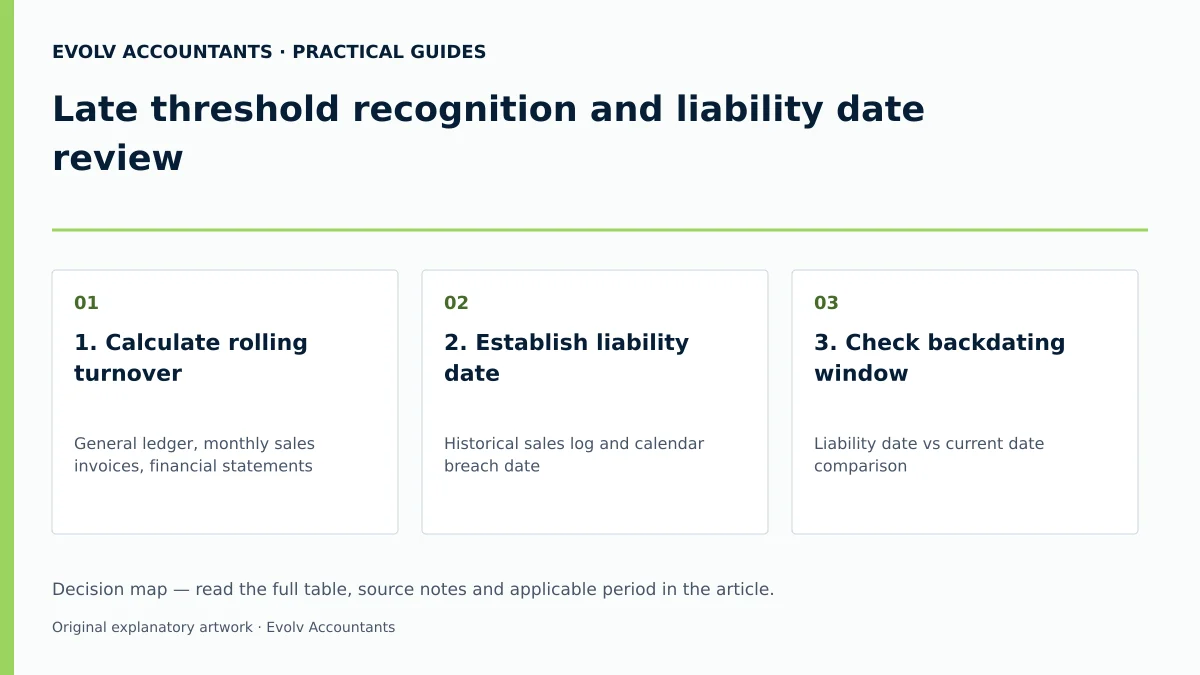
| 1. Calculate rolling turnover | General ledger, monthly sales invoices, financial statements 5 11 | Internal Accountant / Bookkeeper | 12-month taxable sales exceed R2.3m threshold 3 12 | Exclude exempt sales; verify standard and zero-rated totals 35 |
| 2. Establish liability date | Historical sales log and calendar breach date 12 | Representative Vendor / Public Officer 8 | Liability date set as 1st day of month following breach 12 | Calculate 21-business-day application deadline 1 2 |
| 3. Check backdating window | Liability date vs current date comparison 5 | Representative Vendor / Tax Practitioner 30 | Backdating is within 6 months for eFiling 5 | If >6 months, book the SARS branch appointment for the backdating request 5 6 |
| 4. Compile evidence pack | Invoices, signed contracts, bank statement (<3 months), ID proof 13 25 | Representative Vendor | All acceptable documents compiled; projections discarded 13 14 | Execute Power of Attorney if using a registered practitioner 30 |
| 5. Submit Form RAV01 | eFiling profile, RAV01 VAT container fields 21 36 | Representative Vendor / Tax Practitioner | RAV01 submitted; facial biometric check passed 15 16 | Monitor the profile for a Review Notice; meet its 21-business-day document deadline 16 |
| 6. Verify active registration | SARS eFiling profile and public vendor search portal 18 39 | Public Officer / Management | Official Notice of Registration downloaded; status verified online 18 19 | Implement VAT compliance on invoices and accounting software 40 |
Reproducible Hypothetical Example: Apex Logistics CC
Background: Apex Logistics CC is a South African transport enterprise operating in Gauteng. During 2026, the entity experienced an unexpected surge in freight demands.
Step 1: Monthly Rolling Turnover Calculation At the end of June 2026, the bookkeeper performed a 12-month rolling turnover review covering its first trading months from 1 April to 30 June 2026 (assume no earlier enterprise activity or liability):
- 1 April – 31 May 2026 Taxable Sales: R1,950,000
- June 2026 Taxable Sales: R400,000
- Cumulative 12-Month Taxable Turnover: R2,350,000
Step 2: Liability Date and Application Deadline Determination
- Threshold Status: Cumulative turnover exceeded the R2.3 million administrative threshold during June 2026 1 3.
- Statutory Liability Date: 1 July 2026 (the first day of the month following the breach) 12.
- Application Deadline: within 21 business days of becoming liable; record the actual trigger date and calculate the deadline using the SARS business-day rules 1 2.
Step 3: Evaluating Backdating Scenarios
- Scenario A (Timely Filing in July 2026): The 1 July 2026 liability date is within the 6-month eFiling window. The Public Officer completes form RAV01 on eFiling, attaches client invoices and signed freight contracts, and receives the Notice of Registration electronically 5 13 36.
- Scenario B (Delayed Recognition in March 2027): Management discovers the June 2026 breach 9 months later. Because the backdate exceeds 6 months, eFiling rejects automated submission 5. Apex Logistics CC must book the SARS branch appointment required for the backdating request, present historical 2026 financial records, and submit a manual backdating motivation to obtain registration effective from 1 July 2026 5 6.
Frequently Asked Questions
What is the compulsory VAT registration threshold in South Africa?
Under current SARS web guidance, compulsory VAT registration is required when the value of taxable supplies made by a person exceeds R2.3 million in any consecutive 12-month period or under a written contractual obligation 1 3 34. Older published SARS guides reflect the historical R1 million threshold 4.
How quickly must a business apply for VAT registration once the threshold is exceeded?
An enterprise must submit its compulsory VAT registration application within 21 business days from the date the compulsory threshold is exceeded or becomes contractually binding 1 2.
How far back can a compulsory VAT registration be backdated on SARS eFiling?
The eFiling RAV01 system permits automated backdating up to 6 months from the date the compulsory threshold was exceeded 5. If threshold recognition is delayed by more than 6 months, the applicant must book a SARS branch or virtual appointment to present historical proof 5 6.
Which documents are accepted by SARS to prove taxable turnover?
SARS accepts signed annual financial statements, copies of tax invoices issued, signed commercial contracts, sale agreements, and property lease agreements 13. SARS explicitly rejects cash flow projections, business plans, unawarded tender proposals, and unfulfilled purchase orders 14.
How long must a registered vendor retain VAT documentation?
A registered vendor is legally required to retain all tax invoices, banking records, credit notes, and accounting books for a minimum period of 5 years to maintain a verifiable audit trail for SARS 40 50.
Related guides
- VAT refunds offset against another tax debt
- When a South African business must register for VAT
- The Proactive SARS Audit Guide: Keeping Your Business Ledger Sanitised
Sources
- Register for VAT | South African Revenue Service
- https://www.sars.gov.za/wp-content/uploads/Ops/Guides/Legal-Pub-Guide-VAT404-VAT-404-Guide-for-Vendors.pdf
- https://www.sars.gov.za/wp-content/uploads/Ops/Guides/VAT-REG-02-G01-Guide-for-Completion-of-VAT-Application-External-Guide.pdf
- FAQs for VAT vendors | South African Revenue Service
- Obligations of a VAT vendor | South African Revenue Service