
Responding to a VAT supporting document request
18 April 2025

Responding to a SARS VAT supporting document request requires South African SMEs to present verified, complete transactional records matching their VAT201 return.
When the South African Revenue Service (SARS) selects a Value-Added Tax (VAT) declaration for verification or audit, vendors receive an official notification requesting supporting documentation to substantiate declared output tax and input tax deductions 1 2.
To maintain compliance and avoid unexpected processing delays or estimated assessments, small and medium enterprises (SMEs) must identify the requested scope period, verify that every invoice and reconciliation schedule strictly matches the submitted VAT201 return, and secure an official submission receipt upon uploading their evidence pack 1 3 4.
Request scope period and submission receipt
Identifying the Audit Purpose and Issuing Authority
When SARS issues a document request, it is essential to determine whether the request stems from a routine verification or a comprehensive audit 2 5. A verification is a targeted, less intensive evaluation focused on checking specific line items—usually on the vendor's most recently submitted return—to ensure accuracy 2 5. In contrast, an audit involves an in-depth examination of multiple tax periods, accounting ledgers, and third-party data to verify overall compliance 5.
— Practical point from this guide
Official requests are transmitted electronically via eFiling under the "SARS Correspondence" section 1. Opening the notification letter automatically activates a dedicated upload link within the "SUPPORTING DOCUMENTS" container on the relevant VAT201 work page 1.
Understanding the Verification Scope and Timelines
The notification letter specifies the precise tax period under review (the scope period) and outlines the specific records required 1 2. Vendors must adhere strictly to the submission timeframe stipulated in the letter 6 7. Under Section 95(1)(c) of the Tax Administration Act, if a vendor fails to furnish the requested material within the prescribed time, SARS is empowered to issue an estimated assessment 8 9.
If additional time is needed to gather records, vendors can submit a formal request for an extension via eFiling prior to the deadline 6 9. Once the evidence pack is uploaded, clicking "Submit to SARS" generates a verified submission receipt and updates the work page status to "Submitted", providing proof of compliance 3.
Documents grouped by purpose: request scope period
Mandatory Tax Documents
To support a VAT201 declaration, SMEs must assemble mandatory source records that provide legal proof for every entry in Part A (Output Tax) and Part B (Input Tax) 4 10. Law and regulator guidance require the following core documents:
- Tax Invoices for Standard-Rated Inputs: Valid tax invoices containing all statutory details (including the supplier’s and recipient’s full registered names, addresses, VAT numbers, serial numbers, and explicit VAT amounts) for standard-rated purchases declared in Fields 14 and 15 10 11 12.
- Import Documentation: Bills of entry (such as Form SAD 500), official SARS Customs receipts for VAT paid, and EDI Customs Status 1 Release Messages for imported goods claimed in Fields 14A and 15A 13 14 15.
- Output Tax Summary Registers: Sales listings, tax invoice registers, and point-of-sale summaries supporting standard-rated supplies, zero-rated supplies, and exempt supplies declared in Fields 1 to 3 4.
Conditional and Transaction-Specific Records
Depending on the nature of the business operations, conditional documentation must be provided:
- Second-Hand Goods Purchases: A fully completed and signed Form VAT264 declaration, proof of payment, and a copy of the non-vendor seller’s identity document or business letterhead to substantiate notional input tax claims 13 16.
- Agency Transactions: Formal statements provided by agents under section 54(3)(b) detailing tax paid and goods acquired on behalf of the principal vendor 10 14 17.
- Third-Party Banking Nominations: Form VAT119i indemnity forms accompanied by corporate resolutions where a vendor is legally permitted to nominate a group subsidiary or holding company bank account 18 19 20.
Recommended Supporting Schedules and Reconciliation Sheets
Evolv recommends preparing internal reconciliation schedules to streamline the reviewer's audit process:
- VAT201 Line-Item Reconciliations: A structured spreadsheet linking every general ledger tax account directly to Fields 1 through 18 of the VAT201 return 4 21.
- Bank Statement Cross-Referencing: Highlighted bank statements matching payment amounts to high-value tax invoices and import receipts 16 22.
Registration Threshold Alignment
When reviewing financial eligibility, SARS applies administrative registration thresholds 23 24 25. Under statutory rules, compulsory registration applies when taxable turnover exceeds R1 million in a 12-month period 23 26, while voluntary registration requires a minimum of R50 000 in historical or expected turnover 24 25. Current SARS administrative guidelines administer an updated compulsory threshold of R2.3 million 25.
This position represents regulator guidance rather than an unqualified statutory amendment to Section 23 of the VAT Act.
Check identity period and consistency: submission receipt
Cross-Checking Entity Details and Tax Numbers
Before submitting an evidence pack, SMEs must conduct a internal consistency check 22. The registered legal entity name, trading name, and 10-digit VAT registration number appearing on tax invoices must match the SARS Notice of Registration exactly 12 27. Invoices issued in the name of individual directors or unlinked third parties will result in disallowed input tax deductions 10.
Validating Tax Periods and Entitlement Windows
Document dates must align directly with the specific tax period under review 4 17. For input tax claims, the supply must have occurred within the verified tax period or within the allowable 5-year statutory window from the date first entitled to the deduction 17 28. Input tax claims older than five years are statutorily barred and will be disallowed upon audit 17 29.
Mathematical Accuracy and Payment Reference Numbers
Output tax and input tax figures must be mathematically verified using the standard tax fraction (15/115 for the 15% VAT rate) 30 31 32. Furthermore, every document bundle must be referenced against the pre-populated 19-digit Payment Reference Number (PRN) generated on eFiling for that specific VAT201 declaration to maintain complete audit trail integrity 33 34.
Build a reviewer ready evidence pack: request scope period
File Indexing and Naming Conventions
To facilitate rapid processing by SARS auditors, evidence packs should be compiled systematically 1. Evolv recommends creating an electronic file index that mirrors the structure of the VAT201 return:
- Index Schedule: A master PDF listing every document, invoice number, supplier name, net amount, and VAT amount linked to its specific VAT201 field 4 21.
- Clear Naming Conventions: Files should be labelled logically using standardized titles, such as Field15_InputTax_Invoices_CategoryA.pdf or Field01_OutputTax_SalesRegister.pdf.
- Document Formatting: Combine individual invoices into logical PDF bundles, ensuring scans are clear, upright, and legible 1 7.
Submission Channels and Formatting Requirements
Documents must be submitted through authorised digital channels—primarily eFiling or the SARS Online Query System 1 7 35. SARS explicitly rejects photocopied, faxed, or emailed documentation, as well as printed copies of eFiling returns submitted manually at branch offices 36 37 38.
Numbered Checklist for Evidence Pack Assembly
- Open SARS Correspondence: Extract the official document request letter and record the submission deadline 1.
- Export VAT201 Calculation Sheets: Retrieve the general ledger summary supporting the specific return version filed 4 39.
- Gather Primary Invoices: Collect valid tax invoices for standard-rated inputs and cross-check supplier VAT numbers 10 12.
- Compile Import & Special Files: Attach SAD 500 customs releases, EDI messages, or signed VAT264 forms where applicable 13 15 16.
- Construct Master Index: Build a reconciliation spreadsheet cross-referencing document totals to VAT201 Fields 1–18 4 21.
- Upload and Confirm: Upload files into the eFiling "SUPPORTING DOCUMENTS" container, press "Submit to SARS", and archive the "Submitted" receipt 3.
Missing or contradictory records: submission receipt
Authentic Record Reconstruction and Supplier Engagement
If an SME discovers that a primary supplier tax invoice is missing during a verification audit, it must not attempt to create replacement or fictitious documentation 22. Instead, the enterprise should contact the supplier immediately to request an authentic copy clearly stamped or marked "Copy" by the issuer 10.
Statutory Rulings and Prior-Period Omissions
Where an original tax invoice cannot be obtained due to circumstances beyond the vendor's control, Section 16(2)(g) allows a vendor to apply to the Commissioner for a formal VAT ruling authorising alternative documentary proof 40 41. This application must be submitted at least two months prior to the expiry of the 5-year entitlement period, proving that all reasonable steps were taken to obtain the invoice 40 41.
If an input tax deduction was omitted from a past tax period, vendors are legally prohibited from increasing input tax on a revised past VAT201 return 28 42. Regulator guidance dictates that omitted input tax must be claimed in the current or a subsequent VAT return within five years of the original entitlement date 28 42.
- [Omitted Input Tax Identified] > CANNOT alter past VAT201 return 28
- Claim on NEXT VAT201 return (within 5 years) 28 42
Handling Estimated Assessments and Voluntary Disclosures
Where missing records lead to a Section 95(1)(c) estimated assessment, vendors retain the right to submit the outstanding relevant material or request a suspension of payment while submitting the required evidence 6 9. If incomplete or unrecorded tax liabilities are identified across historical periods, businesses can use the Voluntary Disclosure Programme (VDP) to disclose tax defaults voluntarily, obtaining penalty relief provided strict application criteria are met prior to the commencement of an official audit 43 44.
Next steps for VAT refunds
Understanding the 21-Business-Day Statutory Timeline
When a VAT201 return results in a net refund position (Field 20), SARS is legally required to pay the refund within 21 business days of receiving the correctly completed return or all requested supporting documents 45 46 47. If payment is delayed beyond 21 business days without valid statutory cause, SARS is obligated to pay statutory interest at the prescribed rate 46 48.
Grounds for Refund Holds and Interest Suspension
SARS maintains the statutory authority to withhold a refund or suspend the 21-business-day interest clock under specific circumstances 46 49 50:
- Verification or Audit Pending: The refund claim has been selected for verification, inspection, or audit 46 51.
- Outstanding Tax Returns: The vendor has unsubmitted VAT or other tax returns outstanding 46 49 51.
- Defective Banking Particulars: Banking details are unverified, missing, or incorrect 46 49 50.
- Denied Record Access: SARS officers are unable to gain access to the vendor’s books and records 49.
Statutory Record Retention Obligations
Uploading supporting documents to eFiling generates an administrative status of "Submitted", but this does not constitute final assessment or formal legal acceptance by SARS 2 3 51. Vendors must retain all physical and electronic books of account, tax invoices, bank statements, customs documents, and submission receipts for a mandatory minimum period of five years from the date of return submission 52 53 54.
Purpose mapped evidence checklist
| Record | Why it is needed | Required or conditional | Owner | Verification and reference |
|---|---|---|---|---|
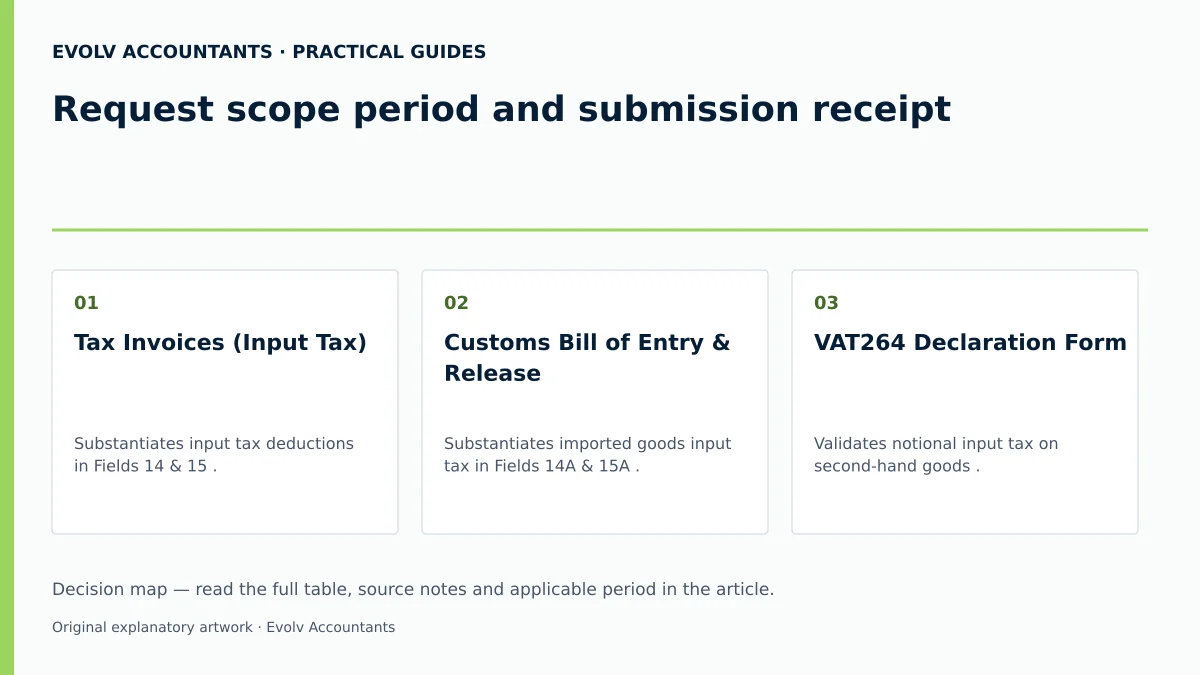
| Tax Invoices (Input Tax) | Substantiates input tax deductions in Fields 14 & 15 10 55. | Required | Finance / Accounts Payable | Validates 10-digit VAT number, invoice date, and 15% VAT fraction 10 12. |
| Customs Bill of Entry & Release | Substantiates imported goods input tax in Fields 14A & 15A 13 14. | Conditional (Import transactions) | Import / Customs Agent | Matches Form SAD 500, SARS payment receipt, and EDI release 13 15. |
| VAT264 Declaration Form | Validates notional input tax on second-hand goods 13 16. | Conditional (Non-vendor purchases) | Procurement / Legal | Requires signed Form VAT264, seller ID copy, and proof of payment 13 16. |
| Sales & Output Tax Register | Proves completeness of output tax declared in Fields 1–3 4. | Required | Finance / Sales | Reconciles general ledger sales accounts to output tax declared 4 21. |
| Section 54(3) Agent Statement | Validates input claims for purchases made via agents 10 17. | Conditional (Agency arrangements) | Managing Agent / Principal | Confirms principal details, itemized tax, and agency agreement 10 14. |
| Form VAT119i Indemnity | Authorizes refund payout into group subsidiary bank accounts 18 19. | Conditional (Group bank accounts) | Public Officer / Board | Requires signed VAT119i, board resolution, and bank letter 18 20. |
Reproducible hypothetical example
(Note: All monetary figures and company details below represent illustrative values for practical demonstration purposes.)
Background and Return Declaration
Apex Manufacturing (Pty) Ltd is a registered VAT vendor operating under Category A (two-month filing period ending May). For the tax period concerned, Apex submitted its VAT201 return via eFiling, declaring the following totals:
- Standard-Rated Supplies (Field 1): R1 150 000 (Exclusive: R1 000 000; Output Tax at 15% in Field 4: R150 000) 30 32.
- Capital Goods Acquired (Field 14): R230 000 (Exclusive: R200 000; Input Tax at 15%: R30 000) 21 55.
- Other Goods/Services Acquired (Field 15): R1 035 000 (Exclusive: R900 000; Input Tax at 15%: R135 000) 21 55.
- Total Input Tax (Field 19): R165 000 21.
- Net Refund Claimed (Field 20): R15 000 (Total Output Tax R150 000 minus Total Input Tax R165 000) 21 33.
SARS Verification Trigger and Response
Upon submission, eFiling generated a pre-populated Payment Reference Number (PRN) and issued an automated document request letter under "SARS Correspondence", selecting the return for verification 1 33. The letter requested supporting evidence for Fields 14 and 15 within 21 business days 1 7.
Apex Manufacturing executed the following steps:
- Compiled Document Bundle: Assembled 12 primary tax invoices supporting Field 15 (R135 000 input tax) and 1 machinery purchase invoice supporting Field 14 (R30 000 input tax) 10 55.
- Reconciled Schedules: Built a master PDF index linking each invoice supplier, VAT number, and tax amount directly to Field 14 and 15 return totals 4 21.
- Uploaded to eFiling: Accessing the VAT201 work page, Apex uploaded Field14_Capital_Machinery.pdf (1 file) and Field15_General_Invoices.pdf (12 files) into the "SUPPORTING DOCUMENTS" container 1 3.
- Submission Receipt: Clicked "Submit to SARS", generating a confirmation status of "Submitted" on the work page 3.
Outcome
Because all submitted tax invoices were valid and reconciled perfectly to Field 20, SARS finalised the verification within 14 business days, releasing the R15 000 refund directly into Apex’s verified bank account within the statutory 21-business-day window without interest suspension 45 46 47.
Frequently Asked Questions
How long does SARS have to process a VAT refund once supporting documents are submitted?
Under statutory rules, SARS must process and pay a VAT refund within 21 business days of receiving a correctly completed return and all requested supporting documents 45 46 47. If SARS fails to pay within 21 business days, statutory interest becomes payable to the vendor at the prescribed rate, unless the 21-day period is lawfully suspended due to an audit, outstanding returns, or unverified banking details 46 48 49.
What happens if an SME fails to submit supporting documents within the deadline specified by SARS?
If a vendor fails to respond to a document request within the stipulated deadline, SARS is authorised under Section 95(1)(c) of the Tax Administration Act to issue an estimated assessment disallowing the unverified input tax claims 8 9. To prevent an estimated assessment, vendors must submit the documents promptly or lodge an official request for an extension on eFiling prior to the deadline 6 9.
Can an SME increase its input tax deduction for a past tax period by submitting a revised VAT201 return?
No. Statutory filing rules explicitly prohibit vendors from increasing input tax deductions on a revised past VAT201 return 28 42. If an input tax deduction was omitted in a previous period, the vendor must claim that input tax on a subsequent VAT201 return, provided the claim is made within five years from the original date of entitlement 28 42.
What steps must be taken if an original supplier tax invoice cannot be obtained for an input tax claim?
If an original tax invoice is lost or destroyed, the vendor should first request a replacement copy from the supplier, clearly marked "Copy" 10. If a copy cannot be obtained due to circumstances beyond the vendor's control, the vendor may apply to the Commissioner under Section 16(2)(g) for a VAT ruling authorising alternative documentary proof 40 41. This ruling application must be submitted at least two months before the 5-year entitlement window expires 40 41.
Does receiving a "Submitted" status on eFiling mean SARS has approved the VAT refund?
No. A "Submitted" status on eFiling merely confirms that the electronic evidence pack has been successfully received by SARS 3. It does not indicate formal approval or legal acceptance of the underlying tax position 2 51. SARS officers must complete the verification or audit review before the refund is formally authorised and released 46 51. Describe the refund query and the records available. Evolv can discuss the support needed for your case. Ask Evolv about request scope period and submission receipt. Share the relevant records so the support required can be scoped.
Related guides
- Why a VAT refund can be delayed
- Tracking a VAT refund through eFiling
- The Proactive SARS Audit Guide: Keeping Your Business Ledger Sanitised
Sources
- https://www.sars.gov.za/wp-content/uploads/Ops/Guides/GEN-ELEC-04-G01-Guide-for-completing-the-Value-Added-Tax-VAT201-Declaration-External-Guide.pdf
- https://www.sars.gov.za/wp-content/uploads/Ops/Guides/Legal-Pub-Guide-VAT404-VAT-404-Guide-for-Vendors.pdf
- VAT Refunds for vendors | South African Revenue Service
- https://www.sars.gov.za/wp-content/uploads/Ops/Guides/VAT-REG-02-G01-Guide-for-Completion-of-VAT-Application-External-Guide.pdf
- FAQs for VAT vendors | South African Revenue Service