
Restoring compliance after an unpaid tax balance
8 November 2024

Restoring tax compliance after an unpaid debt requires settling the balance or securing a formal payment agreement with SARS to update the profile.
When a South African Small or Medium Enterprise (SME) incurs an unpaid tax debt, the South African Revenue Service (SARS) Tax Compliance Status (TCS) profile automatically shifts from compliant to non-compliant 1 2. To restore a green "Compliant" status on the eFiling My Compliance Profile (MCP), the entity must eliminate outstanding debt or formalise an approved instalment payment agreement or payment suspension with SARS 1 2 3 4.
A Tax Compliance Status security PIN provides third parties with real-time access to view the taxpayer's current compliance state, but it does not act as a permanent guarantee of future compliance because SARS continuously monitors obligations 5 6.
Debt payment allocation and status refresh
This practical guide is written for South African SME business owners, financial directors, and registered representatives operating within the South African tax jurisdiction 1 7. The guidance applies to the 2026/2027 tax administrative period, reflecting current SARS eFiling functionality and statutory rules under the Tax Administration Act, 2011 (Act No. 28 of 2011) 8 9.
In South African tax administration, restoring compliance after an unpaid tax balance means systematically clearing tax liabilities, ensuring payments are correctly allocated across tax types, and refreshing the eFiling My Compliance Profile (MCP) to reflect an overall "Compliant" indicator 1 2 10 11. Under the modernised TCS framework, SARS replaced traditional paper Tax Clearance Certificates (TCCs) with an electronic PIN system 8.
A TCS PIN allows authorised third parties—such as municipal procurement departments, commercial clients, or financial institutions—to verify an SME's real-time tax standing directly on eFiling 5 12.
Achieving completion of this task requires four distinct operational outcomes:
- Settlement or formal administrative deferral (via an approved instalment agreement or suspension of payment) of all outstanding principal taxes, penalties, and interest 1 2 3 13.
- Verification that SARS systems have correctly allocated payments against the intended tax type and period using statutory allocation rules 11 14.
- Refreshing the MCP dashboard so that the "Debt" and overall status indicators transition from red ("Non-Compliant") to green ("Compliant") 2 10.
- Generating or re-issuing an active Good Standing TCS PIN to share with third-party verifiers 15 16 17.
Crucially, taxpayers must understand that a TCS PIN is merely an access mechanism to view real-time compliance at the precise date and time of query 5 6. As explicitly stated in SARS compliance documentation, "Your TCS displayed is based on your compliance as at the date and time the PIN is used" 6. Consequently, resolving an unpaid debt is an ongoing governance requirement rather than a one-off administrative event 1 5.
Prepare the information and authority: debt payment allocation
Before initiating a debt payment allocation or status refresh on SARS eFiling, SMEs must prepare the necessary legal authority, registration profiles, and accounting records 1 7 11.
— Practical point from this guide
Distinction Between Law, Regulator Guidance, and Evolv Recommendations
- Statutory Law (Tax Administration Act, 2011): Governs taxpayer payment obligations, statutory interest accrual, SARS recovery powers, and the Commissioner's authority to apply payment allocation rules 9 11 18 19.
- Regulator Guidance (SARS External Guides): Specifies technical steps on eFiling, including updating the Registration, Amendments and Verification (RAV01) form, completing the ERC01 declaration, navigating the MCP, and requesting TCS PINs 15 20 21 22.
- Evolv Recommendations: Advisory best practice provided by Evolv Accountants to ensure SMEs establish robust internal controls, maintain accurate audit trails, and avoid procedural delays when interacting with SARS.
Required Information, Inputs, and Permissions
To execute this task effectively, the SME must compile the following inputs:
- Registered Details and RAV01 Profile: Up-to-date corporate details, including legal entity name, registration number, physical address, and banking particulars registered on SARS RAV01 1 7 22.
- Tax Reference Numbers: Complete list of tax reference numbers across all applicable tax types (Income Tax, Value-Added Tax [VAT], Pay-As-You-Earn [PAYE], Skills Development Levy [SDL], and Unemployment Insurance Fund [UIF]) 1 23.
- eFiling Access and User Authority: Confirmed profile access as either an individual taxpayer or an activated Registered Representative (RR) 7 24. Under SARS rules, an external accountant or tax practitioner cannot be appointed as a Registered Representative on eFiling unless they are a direct employee of the legal entity 7. External tax practitioners must be delegated appropriate rights by the confirmed RR 7 25 26.
- Payment Reference Numbers (PRNs) and Statements of Account: Official SARS PRNs generated for outstanding returns or assessments, alongside recent Statements of Account showing unallocated credits or unpaid debits 14 27.
- Merged Tax Profiles: Confirmation that all tax types registered under the enterprise have been linked using the "Merge Entities" tool on eFiling, or declared via the ERC01 form during TCS activation 1 21 28.
Complete the task step by step: status refresh
To restore a tax compliance profile following debt resolution, follow this sequenced operational procedure on SARS eFiling:
- Activate the Tax Compliance Status Functionality: Log into eFiling, select the relevant taxpayer entity, and navigate to the "Tax Status" tab or click the "Tax Compliance Status" icon on the dashboard 29. Select "Activation" and confirm access to activate "My Compliance Profile" 20 29. If tax profiles remain unmerged, complete the ERC01 declaration form or navigate to "SARS Registered Details" to execute "Merge Entities" 21 28.
- Inspect My Compliance Profile (MCP): Select "My Compliance Profile" under the Tax Compliance Status menu 10. Examine the three core compliance requirements: Registration, Submission of Returns, and Debt 2. Expand the "Debt" container to view the Net Compliance Balance across all tax types 2 23. Identify specific sub-categories displaying a red "Non-Compliant" status indicator 2 23.
- Execute the Appropriate Debt Remedy:
- For Income Tax, VAT, or PAYE debts, hover over or select the non-compliant indicator and choose "How to address non-compliance" 27 30.
- Select Make Payment to settle the balance immediately via eFiling payment channels using the correct PRN 27.
- Select Request Payment Arrangement if the business requires an instalment payment agreement under Chapter 10 of the Tax Administration Act 3 14 27.
- Select Fix My Account for VAT or PAYE if payments were made but remain unallocated or misallocated 14. Select "Allocate all UNALLOCATED payments" or "Reallocate payments" to align funds against outstanding debit balances 14.
- Submit Outstanding Returns: If non-compliance stems from overdue filings alongside debt, select "Submission of Returns", choose "Capture and submit the outstanding return", and complete the relevant tax work page 27.
- Request Status Re-evaluation (Challenge Status): If debt has been paid or a payment suspension granted but the MCP indicator remains red, select the "Challenge Status" button 14 31. Complete the online form stating clear reasons for re-evaluation, attach proof of payment or SARS agreement letters, and submit the request to SARS 31 32.
- Request a TCS Security PIN: Once the MCP displays an overall green "Compliant" indicator, navigate to "Tax Compliance Status Request" 10 15. Select "Good Standing" (or "Approval International Transfer" if transferring funds abroad), complete the mandatory contact details on form TCR01, specify the desired PIN validity period, and click "Submit form" 15 33 34 35 36.
- Issue and Share the TCS PIN: Access the approved request under "Good Standing", expand the reference link, and view the generated TCS PIN 16 37. Use the "SMS PIN" or "Print PIN" action buttons to transmit the PIN to authorised third parties 6 38.
Check the result against the evidence: debt payment allocation
Submitting a payment or filing a request on eFiling does not equal SARS acceptance or immediate profile remediation 14 16. Business owners must independently verify completion against formal evidence 27 32.
Independent Completion Evidence
- Statement of Account Verification: Request an updated Statement of Account for each tax product to verify that the credit has posted, the balance is zero, and no residual interest or administrative penalties remain unpaid 11 27.
- My Account Enquiries Case Tracking: Navigate to "My Account Enquiries" under the Tax Compliance Status menu 39. Check the case status for any submitted "Fix My Account" or "Challenge Status" requests 32 39. Completion is evidenced only when the eFiling status reflects "Case completed" and an official SARS outcome letter is issued 32.
- MCP Dashboard Visual Indicator: Access "My Compliance Profile" and confirm that all individual requirement lines (Registration, Submission of Returns, Debt) and the "Overall Compliance Status" display a green "Compliant" badge 2 10.
- Active TCS PIN Master Record: On the "Tax Compliance Status Request" page, expand the Good Standing table and verify that the PIN Status displays "ACTIVE" with a valid future expiry date 16 38.
- Third-Party Verification Test: Perform a verification check under "Tax Compliance Status Verification" using the tax reference number and PIN to ensure third parties receive a "Compliant" summary result 12 40 41 42.
Handle exceptions and unresolved cases: status refresh
When standard automated refreshes fail or complex debt structures arise, SMEs must navigate specific administrative edge cases:
Payment Allocation and "Fix My Account" Limitations
SARS applies statutory payment allocation rules under Section 10.7 of the Tax Administration Act, typically using a First-In-First-Out (FIFO) method within a tax type 11 43. If a payment was made without a valid PRN, SARS places it in an unallocated account 14. While eFiling provides automated "Fix My Account" screens for VAT and PAYE reallocations, Income Tax reallocation requests cannot be processed automatically on eFiling and require a manual request submitted directly to SARS 14.
"Pay-Now-Argue-Later" and Dispute Payment Suspensions
Under Chapter 10 of the Tax Administration Act, lodging an objection or appeal against an assessment does not automatically suspend the obligation to pay tax 13 18 44. To prevent debt non-compliance during a dispute, the taxpayer must submit a formal request for Suspension of Payment under Section 10.6 13 18. Once granted by a senior SARS official, payment is suspended, and SARS is legally prohibited from allocating payments against that suspended debt or flagging it as non-compliant on the MCP 3 11 45.
Pending Challenge Status Requests
If an SME submits a "Challenge Status" request to rectify an incorrect non-compliant indicator, eFiling blocks any subsequent challenge submissions until the existing case is finalised 14. If the existing case is stalled, the business must track case progress under "My Account Enquiries" or engage SARS directly through a branch appointment or escalation 30 32 39.
Temporary Overrides and PIN Cancellations
If SARS approves a Challenge Status re-evaluation, a limited-time "override" may be applied to the profile, temporarily restoring a compliant status while background verification completes 31. Conversely, if an unpaid balance arises after a PIN is issued, or if SARS detects misrepresentation, SARS reserves the right to cancel the PIN 6 17. Once a PIN status changes to "CANCELLED", third-party verification requests will fail 17.
Next steps for Tax clearance and compliance
Task and Completion Checklist
| Step | Input or evidence | Responsible person | Completion check | Exception or next action |
|---|---|---|---|---|
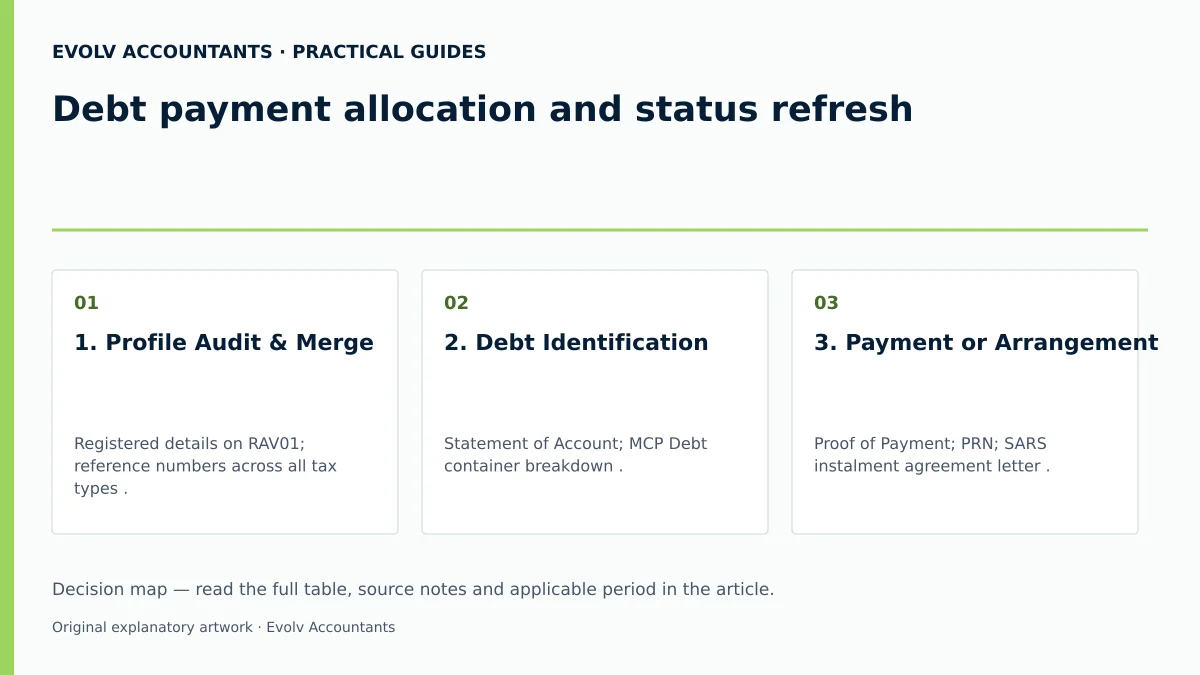
| 1. Profile Audit & Merge | Registered details on RAV01; reference numbers across all tax types 1 22. | Registered Representative / Public Officer 7. | All tax products active and merged on eFiling 1 20. | Submit ERC01 form or update RAV01 at a SARS branch if unmerged 28 30. |
| 2. Debt Identification | Statement of Account; MCP Debt container breakdown 23 27. | Financial Manager / Bookkeeper. | Exact outstanding debt amount identified per tax type 23. | Use "Fix My Account" if payments are missing or unallocated 14. |
| 3. Payment or Arrangement | Proof of Payment; PRN; SARS instalment agreement letter 3 27. | Registered Representative / Tax Director. | Bank payment cleared or formal deferral granted 3 27. | Request Section 10.6 Suspension of Payment if debt is under dispute 4 13. |
| 4. Status Re-evaluation | Payment proof; Challenge Status form submission on eFiling 31. | Evolv Tax Practitioner / Registered Representative 7. | MCP Debt indicator transitions to Green "Compliant" 2 10. | Monitor case progress under "My Account Enquiries" if delayed 39. |
| 5. TCS PIN Issuance | TCR01 application form; contact details on eFiling 34 36. | Registered Representative / Delegated eFiler 15 25. | Good Standing TCS PIN issued with "ACTIVE" status 16 38. | Re-issue or extend PIN validity period if expired 16 17. |
Reproducible Hypothetical Example
Illustrative Example: SME Debt Settlement and Status Restoration
Note: All values, tax references, and figures below are purely illustrative.
Scenario: Enterprise A (Pty) Ltd has an outstanding Income Tax debt of R250.00 arising from an administrative penalty 30. On the eFiling My Compliance Profile (MCP), the Net Compliance Balance displays R250.00 non-compliant, causing the overall TCS indicator to show Red ("Non-Compliant") 23 30.
Step-by-Step Resolution:
- Identification: The Registered Representative accesses the MCP Debt container and expands Income Tax to locate the R250.00 administrative penalty debit 23 30.
- Settlement: The company generates a Payment Reference Number (PRN) on eFiling and settles the exact amount of R250.00 via electronic funds transfer 27.
- Allocation: SARS processes the payment and applies it against the outstanding administrative penalty in accordance with statutory allocation rules under Section 10.7 of the Tax Administration Act 11.
- Refresh & Re-evaluation: The MCP updates, clearing the R250.00 liability and restoring the Debt indicator to Green ("Compliant") 2 10.
- PIN Generation: The company submits form TCR01 on eFiling for Good Standing, selecting a 12-month PIN validity period 15 35 36. SARS issues active TCS PIN 13446ED236, which the entity successfully provides to commercial clients for online verification 5 12 16.
Frequently Asked Questions
1. Does paying an outstanding SARS debt immediately make our business tax compliant?
No. Payment clearance is a primary requirement, but overall tax compliance also requires that all tax returns across all registered tax products are fully submitted, registered particulars are up to date on form RAV01, and all registered tax reference numbers are properly merged 1 2 7. Furthermore, status updates on the MCP dashboard may take time to process after payment reflects on the Statement of Account 10 27.
2. What is the difference between a Tax Clearance Certificate (TCC) and a Tax Compliance Status (TCS) PIN?
SARS modernised tax compliance by replacing paper-based Tax Clearance Certificates with the electronic TCS PIN system 8. A TCC was a static paper document, whereas a TCS PIN is a dynamic digital credential that allows third parties to view the taxpayer's real-time compliance status on eFiling at the exact moment of verification 5 6 12.
3. How does SARS allocate payments when a business owes tax across multiple tax types or periods?
Under Section 10.7 of the Tax Administration Act, the Commissioner determines payment allocation rules based primarily on the First-In-First-Out (FIFO) principle 11 43. Payments are generally applied to the oldest debt within a specific tax type first 11 43. Taxpayers can use the "Fix My Account" tool on eFiling for VAT and PAYE to allocate unallocated funds or request reallocations against specific debit balances 14.
4. Can an external accountant or tax practitioner act as our Registered Representative on eFiling?
No, unless the accountant or tax practitioner is a direct employee of the legal entity 7. Under SARS registration rules, a legal entity can only have one Registered Representative, who must be a duly appointed officer or employee 7. External tax practitioners must activate their own practitioner profiles and be granted delegated access by the entity's confirmed Registered Representative 7 24 25 26.
5. What happens if a third party verifies our tax status using a TCS PIN while an unpaid tax debt arises?
Because compliance status is dynamic, if a new unpaid debt or outstanding return arises after a PIN is issued, the MCP dashboard status will transition to red ("Non-Compliant") 2 5 6. When a third party enters the PIN under "Tax Compliance Status Verification", eFiling will display the non-compliant status at that specific date and time, regardless of whether the PIN was active when originally generated 5 6 42.
Related guides
- Obtaining a tax compliance status PIN
- Tax clearance certificates versus tax compliance status
- The Proactive SARS Audit Guide: Keeping Your Business Ledger Sanitised
Sources
- Manage your Tax Compliance Status | South African Revenue Service
- https://www.sars.gov.za/wp-content/uploads/Ops/Guides/GEN-ELEC-08-G01-Guide-to-the-Tax-Compliance-Status-functionality-on-eFiling-External-Guide.pdf
- https://www.sars.gov.za/wp-content/uploads/Ops/Guides/LAPD-TAdm-G01-Short-Guide-to-the-Tax-Administration-Act-2011.pdf
- https://www.sars.gov.za/wp-content/uploads/Ops/Guides/GEN-REG-01-G04-How-to-Complete-the-Registration-Amendments-and-Verification-Form-RAV01-External-Guide.pdf