
Tax compliance for a dormant company
5 May 2025

Tax compliance for a dormant company in South Africa requires maintaining active SARS registrations, submitting all prescribed tax returns on time, and updating registered particulars.
Even when a corporate entity carries on no active trading operations, earns no income, and incurs no operational expenditure, South African tax law obliges the legal entity to remain registered with the South African Revenue Service (SARS) and satisfy its ongoing administrative obligations 1 2 3. Dormancy under general corporate law or within company records does not confer an automatic exemption from statutory tax filing requirements 3 4.
To maintain a compliant profile, a dormant company must continuously submit annual corporate income tax returns, ensure its registered particulars and representative appointments are up to date on SARS eFiling, and maintain an overall compliant standing across all linked tax types 1 5 6.
Dormant registration duties and actual outstanding items
For directors, financial managers, and appointed representatives of South African small and medium enterprises (SMEs), managing a dormant company involves navigating the statutory framework governed by the Tax Administration Act 28 of 2011 alongside regulatory guidance issued by SARS 2 7 8. Under South African tax law, dormancy does not by itself cancel tax registrations; establish the company’s SARS registrations and any formally approved cancellations 2 3.
Consequently, statutory compliance duties persist throughout every tax assessment period regardless of commercial activity 3 4.
Achieving actual completion of tax compliance for a dormant entity requires more than assuming that inactivity creates compliance 3 9. In practice, completion means verifying that all tax products registered under the company’s corporate profile are fully consolidated 1 5, all historical and current corporate income tax returns are submitted 1 10, any outstanding administrative penalties or tax debts are settled or formally suspended 1 10 11, and an active Tax Compliance Status (TCS) Good Standing PIN is successfully issued 12 13 14.
A TCS security PIN affords authorised third parties electronic access to verify the company’s live compliance standing on eFiling at the exact date and time of viewing 12 15 16. Regulatory guidance emphasizes that a TCS PIN provides access to real-time status and does not constitute a permanent guarantee of future compliance, as a taxpayer’s standing dynamically updates whenever new filing or debt defaults occur 15 16 17.
Prepare the information and authority: dormant registration duties
Before initiating administrative updates or clearing outstanding obligations on SARS eFiling, SME managers must assemble the necessary statutory authority, registered records, and digital inputs 5 18 19.
— Practical point from this guide
Statutory authority and eFiling roles
Under SARS administrative rules, a legal entity must have an activated Registered Representative (RR) recorded on its eFiling profile 18 19. A legal entity can only have one designated Registered Representative who holds full rights to manage legal entity details and perform statutory maintenance on the Registration, Amendments and Verification (RAV01) form 19 20.
An external accountant or tax practitioner cannot act as the Registered Representative unless they are an employee of the company; otherwise, a registered tax practitioner must be delegated access by the confirmed Registered Representative through the eFiling system 19 21.
Core statutory definitions
- Return: A form, declaration, document, or other manner of submitting information to SARS that incorporates a self-assessment or serves as the basis for a SARS assessment 22 23.
- Registered Representative: A natural person appointed with full legal authority to act on behalf of a legal entity regarding tax obligations 19.
- Tax Compliance Status (TCS) System: The electronic portal on SARS eFiling introduced in 2015 to replace legacy paper Tax Clearance Certificates 7 12.
- My Compliance Profile (MCP): The dynamic dashboard on eFiling displaying visual colour indicators for Registration, Return Submission, and Debt 24 25 26.
- RAV01 Form: The official Registration, Amendments and Verification electronic form used to maintain legal entity demographics, addresses, banking details, and tax product subscriptions 18 27.
Required preliminary inputs and documents
- Corporate Details: CIPC registration number, official registered company name, registered physical address, and postal address 28 29 30 31.
- Tax Identification Numbers: Corporate Income Tax reference number, alongside any historical Value-Added Tax (VAT) or Pay-As-You-Earn (PAYE) reference numbers registered to the entity 5 20 28.
- Representative Identification: Identity document or passport of the appointed Registered Representative, accompanied by formal company resolution documents authorising the appointment if SARS records require verification 29 32.
- Banking Evidence: Valid company bank account particulars verified by SARS, necessary for maintaining registered profile integrity 1 6 29.
Complete the task step by step: actual outstanding items
Resolving outstanding items and establishing tax compliance for a dormant company requires executing a structured sequence on SARS eFiling 5 10 33.
- Activate Registered Representative Status: Log into SARS eFiling under the Organisation portfolio 33 34. Navigate to Organisations > SARS Registered Details > Activate Registered Representative 34 35. If SARS records already reflect the appointment, activation completes immediately 32. If not, the system issues a Request Under Verification status, requiring the upload of legal entity authorisation documents 32 35.
- Consolidate Tax Reference Profiles: Access SARS Registered Details and execute the Merge Entities function 5 34 36. Merging consolidates all separate tax reference numbers (Income Tax, VAT, PAYE) under a single legal entity profile, ensuring that the compliance dashboard reflects the entity's complete standing 1 5 36.
- Activate Tax Compliance Status (TCS) Services: Select the Tax Status tab from the main menu 33. Select Tax Compliance Status Service Activation, select Tax Compliance Status, enter the Income Tax Reference Number, accept the authorisation disclaimer, and click Activate 33 37. Complete the Entity Reference Number Confirmation process to finalise profile activation 37 38.
- Review My Compliance Profile (MCP): Navigate to Tax Compliance Status > My Compliance Profile 25. Inspect the three main compliance categories: Registration, Submission of Returns, and Debt 25 26. Note any Red indicators signifying non-compliance or outstanding obligations 26.
- Submit Outstanding Nil Income Tax Returns: If the Submission of Returns indicator is Red, click the expand button and select How to address non-compliance 10 26. Click Capture and submit the outstanding return to open the Income Tax Work Page for each unfiled tax period 10. Complete each required ITR14 from the actual records, selecting the applicable dormant-company fields. Use zero figures only where supported: bank interest, fees, assets or other transactions may still need disclosure, and submit the return to SARS 3 10.
- Settle or Address Outstanding Debt and Penalties: If the Debt indicator is Red due to unpaid administrative penalties, select How to address non-compliance 10 26. Evaluate payment options, submit a request for an instalment payment agreement under section 167 of the Tax Administration Act, or file a formal penalty remission application if statutory criteria are met 10 11 39.
- Maintain Registered Details on Form RAV01: Navigate to SARS Registered Details > Maintain SARS Registered Details 40. Accept the authorisation declaration 40. Edit any outdated registered addresses, contact details, or trading names 30 41. Submit the updated RAV01 form using One-Time Pin (OTP) authentication 42.
- Request and Issue Tax Compliance Status (TCS) PIN: Select Tax Compliance Status Request on the TCS menu 25 43. Select Good Standing as the application type and submit the TCR01 request 13 43. Upon approval, expand the request reference link to view, print, or SMS the active TCS PIN 14 16 43.
Check the result against the evidence: dormant registration duties
Assuming that submitting a return or updating details automatically guarantees compliance is an administrative error 15 44 45. SME management must independently verify completion against primary evidence sources 25 45 46.
- My Compliance Profile Indicator Verification: Re-examine the MCP dashboard on eFiling 25. Confirm that Registration, Submission of Returns, and Debt all display Green Compliant indicators, or Compliant (New Taxpayer/Registrant) for newly registered entities 14 25 26.
- RAV01 Processing Status: Check the Registration Work Page under SARS Registered Details to ensure the RAV01 maintenance case status reflects Case Completed or Active rather than Waiting for Documentation to be Uploaded or Request Under Verification 32 35 47.
- Official Assessments and Notices: Access SARS Correspondence > Search Correspondence on eFiling 46. Download and inspect the Notice of Assessment (ITA34) for each submitted dormant return to verify that SARS processed the return as filed without raising an estimation assessment 8 46 48.
- TCS PIN Issuance Certificate: Verify that the generated TCS PIN details display an ACTIVE status on the TCS Work Page 16 45. Evolv recommends downloading and archiving the official Tax Compliance Status PIN Issued letter, which records the taxpayer name, reference number, PIN, and expiry date 16.
Handle exceptions and unresolved cases: actual outstanding items
When standard processing encounters delays or administrative barriers, specific statutory and procedural rules apply 39 48 49.
Deactivation of inactive tax types
If a dormant company remains registered for VAT or Payroll Taxes (PAYE/SDL) that are no longer applicable, the entity must formally adjust its registrations 30 49. Under eFiling rules, SDL liability must be checked separately; employers whose expected leviable remuneration does not exceed R500,000 over the relevant 12 months are exempt 49.
Deactivating a PAYE or VAT registration cannot always be completed fully online and may require the Registered Representative to book an appointment at a SARS branch with supporting documentation 49 50.
Administrative penalties and estimated assessments
A dormant company can still incur non-compliance penalties for required returns that remain outstanding. SARS may issue an estimated assessment where the information needed for assessment is missing. Submit the actual outstanding return and review the notice’s correction, objection and payment instructions promptly; do not treat an estimate as an irrevocable final determination. SARS tax-administration guidance.
Penalty remission and dispute boundaries
Taxpayers may apply to SARS for the remittance of administrative non-compliance penalties using the prescribed eFiling form prior to the penalty due date 39. Statutory grounds for remission include SARS capturing errors, processing delays, or personal distress/hardship 53. If SARS issues a decision refusing to remit the penalty, the taxpayer holds the right under Chapter 9 to lodge an objection and appeal specifically against the decision not to remit 54.
Next steps for Tax clearance and compliance
Task and completion checklist
| Step | Input or evidence | Responsible person | Completion check | Exception or next action |
|---|---|---|---|---|
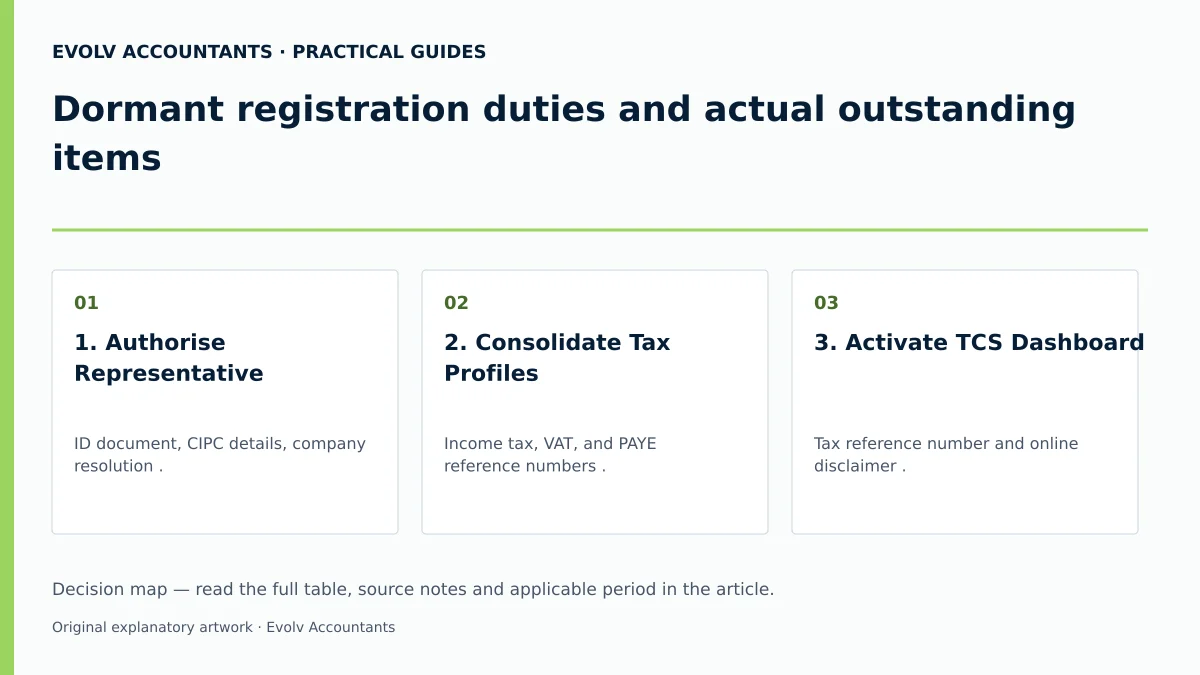
| 1. Authorise Representative | ID document, CIPC details, company resolution 29 32. | Company Director / Public Officer 19. | eFiling shows Active Registered Representative status 32. | If Request Under Verification, upload supporting documents within SARS timelines 32 46. |
| 2. Consolidate Tax Profiles | Income tax, VAT, and PAYE reference numbers 5 28. | Registered Representative / Tax Practitioner 5 19. | All tax types visible under single eFiling profile 5 36. | Complete eFiling Merge Entities function or declare on form ERC01 5 36. |
| 3. Activate TCS Dashboard | Tax reference number and online disclaimer 33 37. | Registered Representative 19 33. | MCP dashboard accessible under Tax Status menu 25 33. | Finalise Entity Reference Number Confirmation screen 37 38. |
| 4. File Dormant Returns | Actual financial records, bank statements, ITR14 3 10. | Tax Practitioner / Accounting Officer 10 19. | Actual return submission and any assessment checked; recheck the MCP return indicator and other outstanding items 26 46. | If SARS issues section 95 estimation, capture and submit the actual outstanding return promptly 10 48. |
| 5. Settle or Remit Debt | Statement of Account, penalty assessment notices 10 51. | Registered Representative / Financial Manager 19 51. | Account balance shows R0.00 or approved payment arrangement 10 11 26. | Submit formal penalty remission application under Chapter 15 if grounds exist 39 53. |
| 6. Issue Good Standing PIN | TCR01 electronic application form 43. | Registered Representative / Tax Practitioner 19 43. | Active TCS PIN letter generated and printable 16 45. | Verify live status on eFiling prior to issuing PIN to third parties 15 16. |
Reproducible hypothetical example
Consider Apex Dormant Solutions (Pty) Ltd, a dormant South African SME incorporated in 2024 that conducted no business activity during the 2025 and 2026 tax periods.
- Initial Standing: The company profile reflected Red non-compliant indicators on eFiling due to two unfiled annual corporate income tax returns (2025 and 2026), which triggered an administrative penalty assessment of R250 per month (illustrative fixed-amount penalty item) 50 51.
- Corrective Actions: The appointed Public Officer activated her Registered Representative profile on eFiling 35, merged the corporate tax types 36, and submitted two nil ITR14 returns reflecting R0 turnover and R0 expenditure 3 10. Concurrently, the entity submitted a penalty remission request under section 215 citing initial setup inactivity 39 53.
- Result: SARS processed the nil returns, issuing zero-liability ITA34 assessments 8 46. Upon approval of the penalty remission, the debt balance returned to R0.00 26 39. The entity successfully requested a Good Standing TCS PIN, restoring its verified tax compliance standing on eFiling 14 43.
Frequently Asked Questions
Does a dormant company need to submit tax returns to SARS every year?
Yes. South African tax law requires every registered corporate entity to submit annual corporate income tax returns, even if the entity had zero trading activity, zero income, and zero assets during the tax year 1 3 4.
What is the difference between a Tax Clearance Certificate and a Tax Compliance Status PIN?
The traditional paper Tax Clearance Certificate (TCC) was replaced by the electronic Tax Compliance Status (TCS) system 7 12. Instead of a paper certificate, SARS issues a security PIN that allows third parties to view the company's real-time compliance status online via eFiling 12 15.
Why does My Compliance Profile show red when the company has no trading activity?
A Red indicator on My Compliance Profile signifies administrative non-compliance, such as an unfiled annual return, an unmerged tax profile, outdated registered details, or an unpaid administrative penalty 1 5 26 51.
Can an external accountant act as the Registered Representative for a dormant company on eFiling?
No. Under SARS rules, an external accountant or tax practitioner cannot be appointed as the Registered Representative unless they are a direct employee of the company 19. The Registered Representative must be a duly authorised company officer (such as a director or public officer), who may then delegate filing rights to a registered tax practitioner on eFiling 19 21.
What happens if SARS issues an estimated assessment for an unfiled dormant return?
SARS may estimate an assessment where a required return is missing. Submit the actual outstanding return, retain the assessment and filing evidence, and check the applicable correction and dispute procedure. Seek advice promptly if the notice is contested. SARS assessment guidance. Ask Evolv about dormant registration duties and actual outstanding items. Share the relevant records so the support required can be scoped.
Related guides
- Sharing a TCS PIN with a customer or tender office
- Obtaining a tax compliance status PIN
- The Proactive SARS Audit Guide: Keeping Your Business Ledger Sanitised
Sources
- Manage your Tax Compliance Status | South African Revenue Service
- https://www.sars.gov.za/wp-content/uploads/Ops/Guides/LAPD-TAdm-G01-Short-Guide-to-the-Tax-Administration-Act-2011.pdf
- https://www.sars.gov.za/wp-content/uploads/Ops/Guides/GEN-ELEC-08-G01-Guide-to-the-Tax-Compliance-Status-functionality-on-eFiling-External-Guide.pdf
- https://www.sars.gov.za/wp-content/uploads/Ops/Guides/GEN-REG-01-G04-How-to-Complete-the-Registration-Amendments-and-Verification-Form-RAV01-External-Guide.pdf