
UIF declarations during unpaid leave
4 April 2025

An employee on unpaid leave is still employed. UIF declarations must reflect the actual employment status and remuneration, including a full month with no pay where applicable.
UIF declarations during unpaid leave must reflect the employee’s actual status and remuneration.
A full month with no UIF remuneration produces no contribution for that employee; a partly paid month may still produce a contribution. SARS contribution rules.
Unpaid leave does not itself end the employment relationship. Declare the actual employment circumstances and remuneration through the prescribed UI Commissioner channel. For a full month with no UIF remuneration, the contribution is zero; for a partly paid month, calculate it on actual UIF remuneration up to the monthly ceiling.
Submission preserves the reported record; benefit eligibility remains for the UIF to determine. SARS contribution rules; uFiling submission guidance.
— Practical point from this guide
Employment continuity and unpaid leave declarations
This guide applies specifically to commercial small and medium enterprise (SME) employers, payroll managers, and financial administrators operating within the jurisdiction of the Republic of South Africa 12 13 14. The legal framework governing these obligations is established by the Unemployment Insurance Act 63 of 2001 (UI Act) and the Unemployment Insurance Contributions Act 4 of 2002 (UIC Act), administered jointly by the Department of Employment and Labour and the South African Revenue Service 1 14.
All statutory financial threshold calculations in this draft reflect the active legislative ceiling of R17,712 per month (R212,544 per annum) effective from 1 June 2021 7 8 15.
Completing unpaid leave declarations requires employers to distinguish clearly between statutory legal obligations, regulator administrative guidance, and practical operational procedures:
- Statutory Law: Employers must provide the prescribed monthly employee information to the UI Commissioner containing specified employee details to the UI Commissioner by no later than the 7th day of each calendar month 4 5 16.
- Regulator Guidance: Official SARS and Department of Employment and Labour guides mandate that regardless of whether an employer pays monthly contributions to SARS via eFiling, all employee-level status declarations (UI-19 data) must be submitted directly to the UI Commissioner 5 6 17.
- Evolv Recommendation: Evolv recommends maintaining synchronised payroll registers that flag unpaid leave periods explicitly without removing employees from active payroll lists, ensuring seamless monthly uFiling status updates and preventing accidental service break entries.
Completion of the unpaid leave declaration process is achieved only when the employer has both submitted an accurate zero-remuneration status update to the UI Commissioner for the affected employee and aligned their monthly SARS EMP201 payment return with total company payroll figures 8 18 19.
Prepare the information and authority: employment continuity
Required documentation and input records
Before executing an unpaid leave declaration, payroll personnel must gather verifiable source records to substantiate the non-remunerative period 20 21. Key inputs include:
- Identity Documentation: Valid South African Identity Number or Passport details for the affected employee 20 22.
- Employment History Details: Verified commencement date of employment and current job designation 20.
- Approved Leave Records: Formal employer authorisation documentation, such as medical certificates for unpaid sick leave, written maternity agreements, or temporary unpaid leave notices 2 23.
- Payroll Calculation Schedules: Evidence demonstrating zero remuneration paid or payable for the specific calendar month 9 20.
Authority and portal access permissions
Submitting declarations online requires designated system roles within the uFiling platform 12 13. Employers must ensure that internal staff or appointed external practitioners possess appropriate profile rights 12 24:
- Commercial Employer Profile: Primary account holder authority linked to the entity's UIF reference number 13 25.
- Tax Practitioner or Delegate Profile: Authorised third-party delegates granted specific functional permissions, including "Capture Declarations" and "Submit Declarations" 12 24.
Statutory definitions and baseline thresholds
Under section 1 of the UIC Act, remuneration excludes commission, pensions, superannuation or retiring allowances and the specified statutory gross-income lump sums. SARS UIF guide. Under Section 4 of the UIC Act, "every employer and every employee to whom the UIC Act applies, must on a monthly basis contribute to the UI Fund" 27.
Exclusions apply only to workers employed for fewer than 24 hours a month with a given employer, public office holders, and public sector officers 28 29.
The statutory contribution rate is 2% of total remuneration, structured as a 1% deduction from the employee and a 1% contribution paid by the employer 7 30 31. For earnings exceeding R17,712 per month, the maximum monthly deduction is capped at R177.12 for the employee and R177.12 for the employer (R354.24 total per month) 8 32. During a full calendar month of approved unpaid leave with no UIF remuneration paid or payable, the employee’s UIF remuneration is R0.00, making the calculated 2% contribution exactly R0.00 7 30.
Complete the task step by step: unpaid leave declarations
Employers must follow a structured, sequential process when executing monthly declarations for employees on unpaid leave 4 18 19:
- Verify Leave Status and Pay Period: Confirm that the employee is on approved, non-remunerative leave for the full calendar month and that employment has not been terminated 2 20.
- Access the uFiling Portal: Log in to the uFiling service using valid credentials or launch integrated payroll software configured for UI Commissioner submissions 10 22 33.
- Navigate to Declarations Manager: Select the registered commercial employer entity and locate the employee record under the active employment list 18 34.
- Update Monthly Remuneration and Salary Fields: Open the employee declaration screen for the target period. Capture "Gross Salary Per Month" as R0.00 and "UIF Deductible Salary" as R0.00 20 35.
- Confirm Active Employment Status: Ensure the "Termination Date" field remains blank and the status indicator reflects "Active" 20 32. Do not select termination codes such as resignation or dismissal 32 36.
- Recalculate and Review Return: Click "Calculate Returns" within uFiling to refresh the monthly summary. Verify that uFiling displays R0.00 contribution due for the unpaid worker while maintaining total company employee counts 35 37.
- Submit Employee Return to UI Commissioner: Execute the submission command before the 7th of the following month. Confirm that the dashboard status updates from "Pending" to "Submitted" 4 37 38.
- Complete SARS EMP201 Payment Declaration: On SARS eFiling or e@syFile, complete the monthly EMP201 declaration 8 19. Include the zero UIF contribution for the unpaid employee within the total company payroll summary, obtain the Payment Reference Number (PRN), and submit the return by the statutory deadline 8 19 39.
Check the result against the evidence: employment continuity
Employers must independently verify successful submission rather than assuming initial data entry equals regulatory acceptance 37 40. Completion evidence must be extracted and filed across both regulatory portals:
uFiling Verification Evidence
- Declaration Dashboard Status: Verify that the target month reflects a green "Submitted" status banner within uFiling's "View Employer Returns" screen 37 38.
- Employee Declaration Status Record: Check the "View My Employee Declarations" summary to confirm that the employee's monthly record displays R0.00 earnings alongside an "Active" employment status 41 42.
SARS Verification Evidence
- EMP201 Receipt and PRN: Retain the issued SARS EMP201 declaration receipt containing the unique 19-digit Payment Reference Number (PRN) matching the monthly payroll declaration 8 19.
Statutory Record-Keeping Compliance
In terms of Paragraph 14(1) of the Fourth Schedule to the Income Tax Act and Chapter 4 of the Tax Administration Act, employers are legally obligated to retain all payroll registers, employee details, and declaration receipts for a minimum period of 5 years from the submission date 21 43. These records must be readily accessible for inspection by SARS or Department of Employment and Labour officials 21 43.
Handle exceptions and unresolved cases: unpaid leave declarations
Partial-Month Unpaid Leave
When an employee takes unpaid leave for a portion of a calendar month, remuneration is calculated on a pro-rata basis for days worked 30 44. The 1% employee deduction and 1% employer contribution apply to the actual gross remuneration earned during that month, up to the statutory cap of R17,712 per month 7 8 30.
System Vetting and Profile Failure
If an employer or delegate encounters account suspension or a "Vetting Failed" message on uFiling, system access will be restricted 45 46. If vetting fails, follow the portal prompt to contact uFiling Support through “UIF Services Support”. Send identity documents only through the route and with the safeguards specified by the support team. uFiling user guide.
Reconciliations and EMP501 Reporting
During the interim and annual employer reconciliation periods (EMP501), total monthly UIF liabilities declared on EMP201s must equal the cumulative UIF figures reflected on employee IRP5/IT3(a) certificates 48 49. Non-remunerative months must reflect R0.00 UIF contributions on the certificate while preserving continuous employment start and end dates 20 48.
Specialist Boundaries
Payroll administrators should escalate complex edge cases to legal or tax specialists when unpaid leave overlaps with formal labour disputes, Commission for Conciliation, Mediation and Arbitration (CCMA) referrals, or disputed constructive dismissal claims 36 50.
Next steps for UIF employer duties
Task and completion checklist
| Step | Input or evidence | Responsible person | Completion check | Exception or next action |
|---|---|---|---|---|
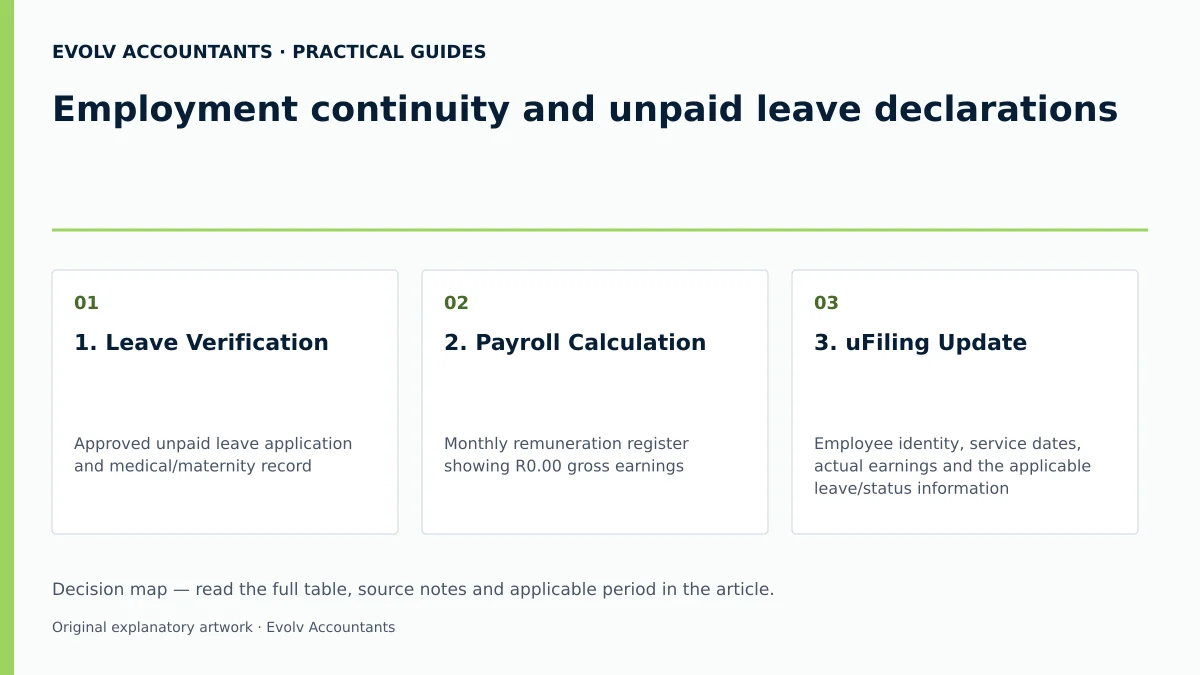
| 1. Leave Verification | Approved unpaid leave application and medical/maternity record 2 23 | HR / Payroll Officer | Confirm continuing employment, actual leave circumstances and pay for the period | Reclassify as paid leave if remuneration accrues 9 |
| 2. Payroll Calculation | Monthly remuneration register showing R0.00 gross earnings 9 20 | Payroll Administrator | Verify R0.00 UIF deduction calculation 7 30 | For a partly paid month, calculate on actual UIF remuneration up to the monthly ceiling |
| 3. uFiling Update | Employee identity, service dates, actual earnings and the applicable leave/status information | Authorised uFiling user | Status marked "Submitted" in uFiling Declarations Manager 37 38 | Log support ticket if uFiling vetting failure occurs 46 |
| 4. SARS EMP201 Return | Monthly EMP201 return on eFiling / e@syFile 8 19 | Financial Manager / Accountant | PRN generated and total UIF liability submitted 8 19 | Where SARS collection applies, pay the monthly amount by the seventh calendar day after month-end, brought forward if necessary |
| 5. Audit File Archiving | Submission receipts, EMP201 forms, and leave records 8 21 38 | Compliance Officer / Bookkeeper | Records stored securely in 5-year compliance archive 43 | Produce records upon demand during SARS/UIF audit 43 |
Reproducible hypothetical example
To illustrate the practical mechanics, consider Apex Logistics (Pty) Ltd, a commercial SME employing two full-time staff members during the target monthly payroll period:
- Employee A (Operations Director): Earns a gross monthly salary of R25,000.00 7 8.
- Calculation: Remuneration exceeds the statutory cap of R17,712.00 7 8.
- Employee Deduction (1%): Capped at R177.12 8.
- Employer Contribution (1%): Capped at R177.12 8.
- Total Contribution: R354.24 8 32.
- Employee B (Logistics Coordinator): On approved unpaid maternity leave for the entire calendar month; gross salary received is R0.00 20 23.
- Calculation: Remuneration is R0.00 7 30.
- Employee Deduction (1%): R0.00 7 30.
- Employer Contribution (1%): R0.00 7 30.
- Total Contribution: R0.00; Status remains "Active" 20 32.
Combined Declaration Outcomes:
- uFiling Declaration: Both Employee A and Employee B are included in the monthly uFiling declaration 18 34. Employee B is submitted with R0.00 salary and "Active" status, preserving employment continuity 20 35.
- SARS EMP201 Payment Return: Apex Logistics declares a total company UIF liability of R354.24 on its EMP201 return 8 19. Payment is executed using the pre-populated PRN prior to the 7th of the month 8 19 51.
Frequently Asked Questions
1. Must I declare an employee on unpaid leave if no UIF contribution is payable?
Yes. Employers must submit monthly employee details to the UI Commissioner every month regardless of whether contributions are payable 4 5 6. Submitting R0.00 remuneration maintains the employee's active record on the national database 20 52.
2. Does a UIF declaration guarantee benefits during unpaid leave?
Accurate employee details maintain the employment history used when UIF assesses a claim. uFiling supports maternity and illness benefit applications, but a declaration or an “Active” label does not itself establish eligibility or guarantee a benefit. Use the status appropriate to the actual leave and the current UIF instructions. uFiling user guide.
3. Should I enter a termination date on uFiling when an employee starts unpaid leave?
No. Entering a termination date removes the employee from active employment records and indicates a formal end to the employment relationship 20 32. Unpaid leave requires maintaining an active employment status with blank termination fields 20 32.
4. What happens if an employer fails to submit monthly UIF declarations during unpaid leave?
Failure to render required returns or keep records constitutes an offence under Chapter 17 of the Tax Administration Act and the UIC Act 6 53 54. Defaulting employers may face estimated assessments, interest, administrative penalties, or legal prosecution 40 55 56 57.
5. Is the SARS EMP201 submission sufficient to fulfil UIF employee declaration duties?
No. The SARS EMP201 is solely a financial payment return 8 19. Statutory rules require that individual employee-level UI-19 declarations must be submitted directly to the UI Commissioner via uFiling or approved electronic payroll feeds 5 6 17.
Related guides
- UIF obligations when an employee works for two employers
- When a small business must register for UIF
- Compliance and Regulations: Keeping Your Business on Track
Sources
- https://www.sars.gov.za/wp-content/uploads/Ops/Guides/UIF-GEN-01-G01-Guide-for-Employers-in-respect-of-the-Unemployment-Insurance-Fund-External-Guide.pdf
- https://www.labour.gov.za/DocumentCenter/Publications/Unemployment%20Insurance%20Fund/uFiling%20System%20User%20Guide.pdf
- Unemployment Insurance Fund
- Unemployment Insurance Fund | South African Revenue Service
- Unemployment Insurance Fund